
Run your care company from one place.
Rota, staff, residents and clients, medicines, care notes and vehicles together. Managers plan and watch the day on a PC, and staff get a simple app on their phone. Works for home care, care homes, or both.
Free for up to 3 staff and 10 clients, no card needed. Set up in about 2 minutes.
Already using Legends Care Hub? Log in here (managers and carers).
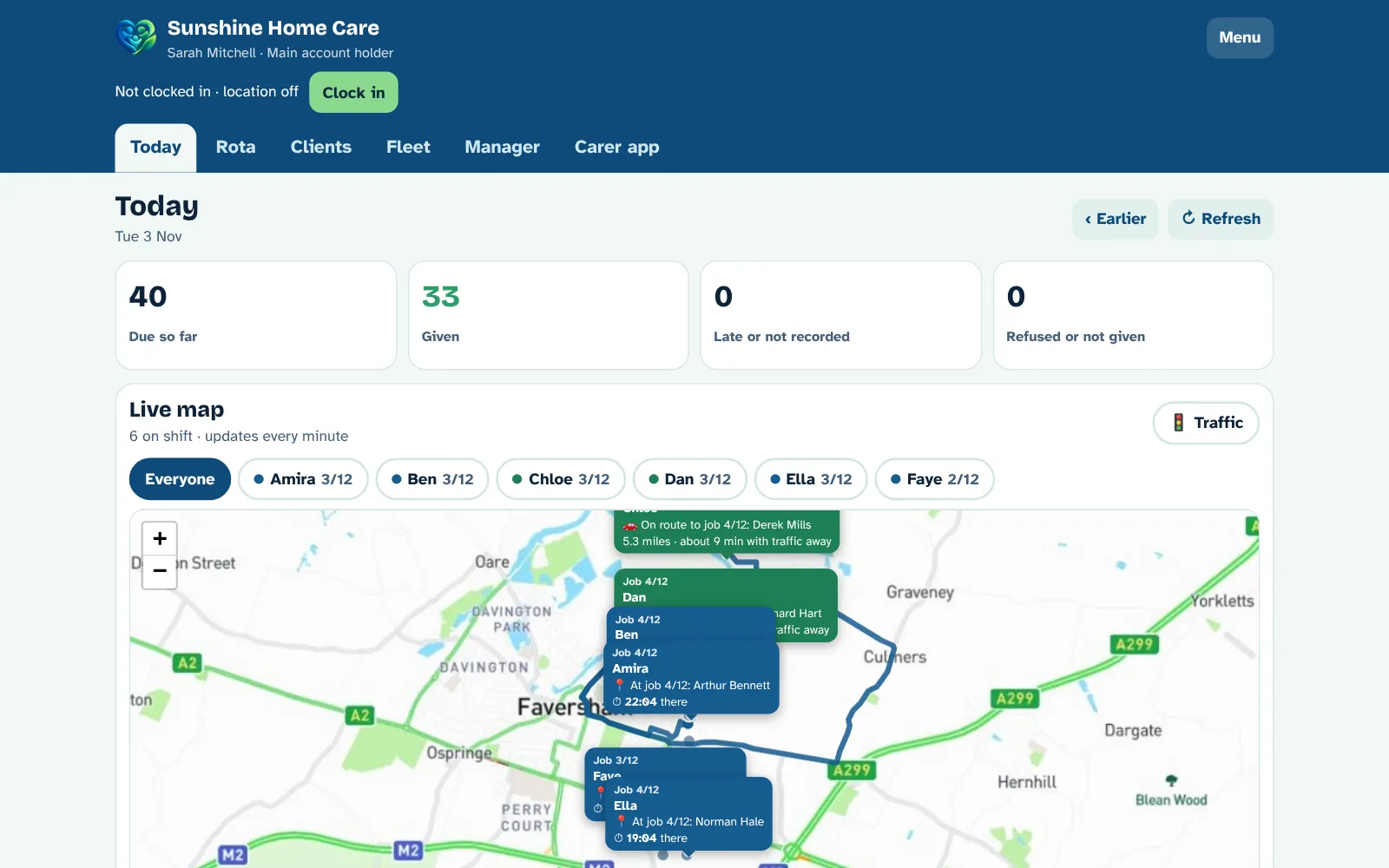
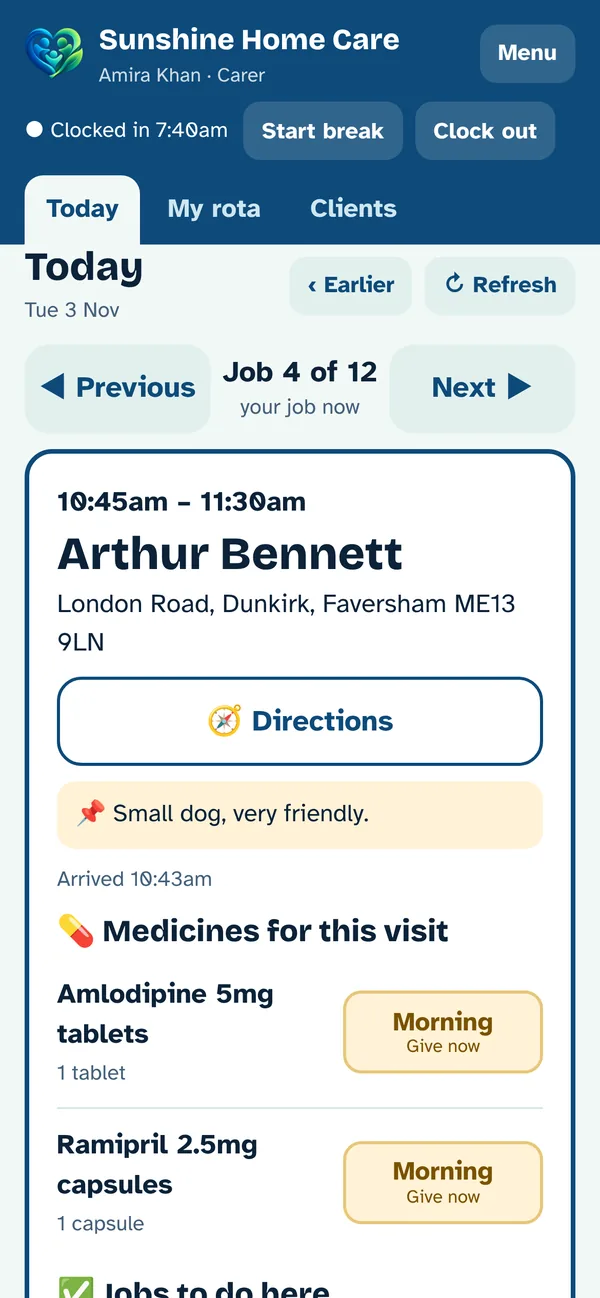
Screenshots use a made-up company and made-up clients, with real street names only.
See the Care Hub in action
58 seconds, with music. Tap play.
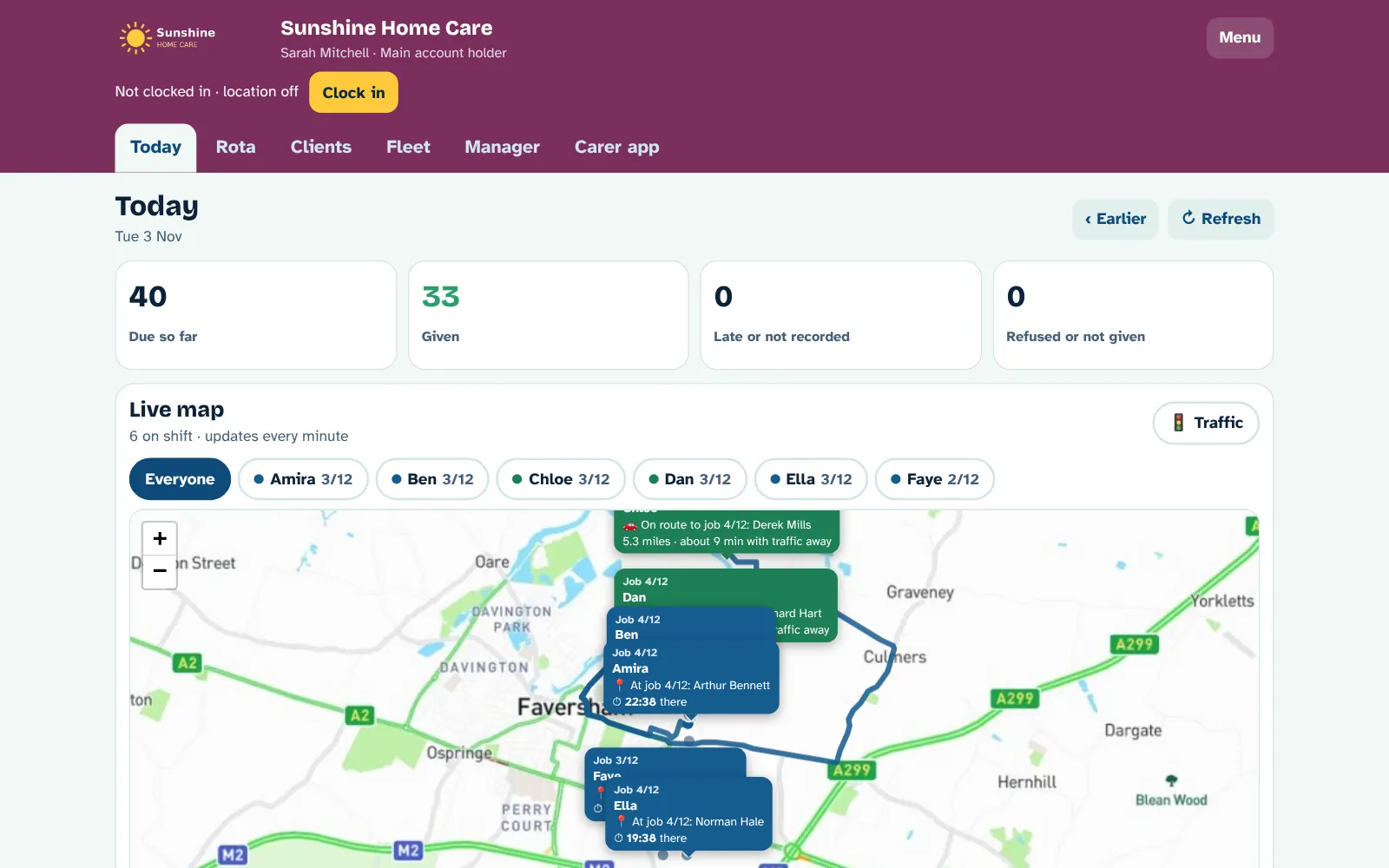
See your whole day, and every carer on the map
The Today screen shows every carer on shift and exactly where they are in their day, with the live map built in.
- Who is at a job, with a counter showing how long they've been there
- Who is on the way, to which client, and how far they have to go
- Arrival times with live traffic, like "1.2 miles · about 6 min with traffic"
- Tap a carer's name and their whole day is drawn along the real roads, numbered in order, with miles and driving time
- A Traffic switch that colours the roads green, orange or red
- Medicines due, given, late and refused, updated as it happens
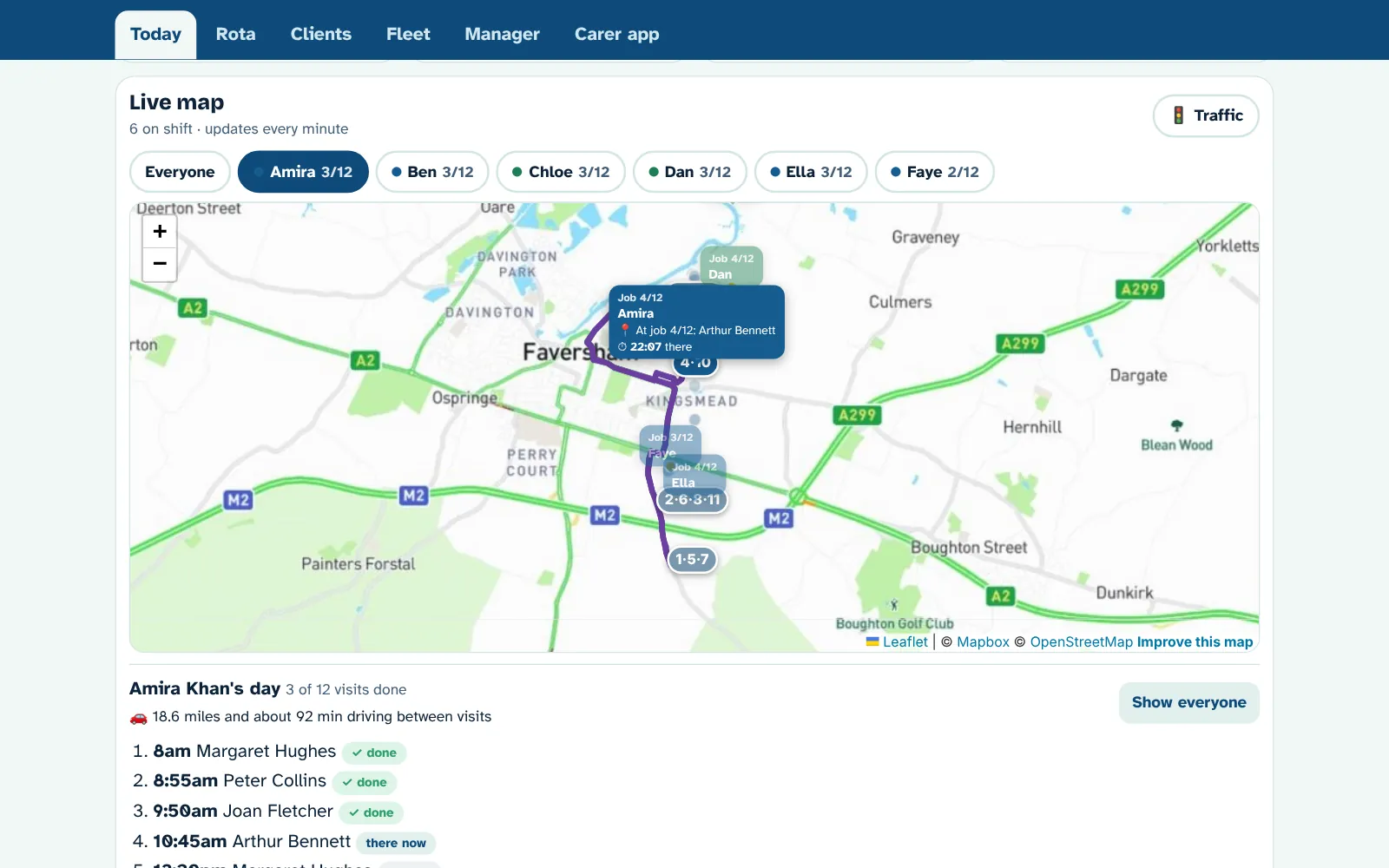
A rota you can see and move
A big grid with your carers down the side and the times along the top, with the drive time between each visit.
- Drag a visit onto another carer to move it, or tap it and pick someone
- Swap the order of two visits if it makes a better round
- A clients grid too, so you can check every client is covered
- Warnings for double-bookings, not enough time to drive, no carer booked and missing training
- Visits that need two carers, with both shown together
- Regular weekly times, plus one-day changes that don't touch the usual rota
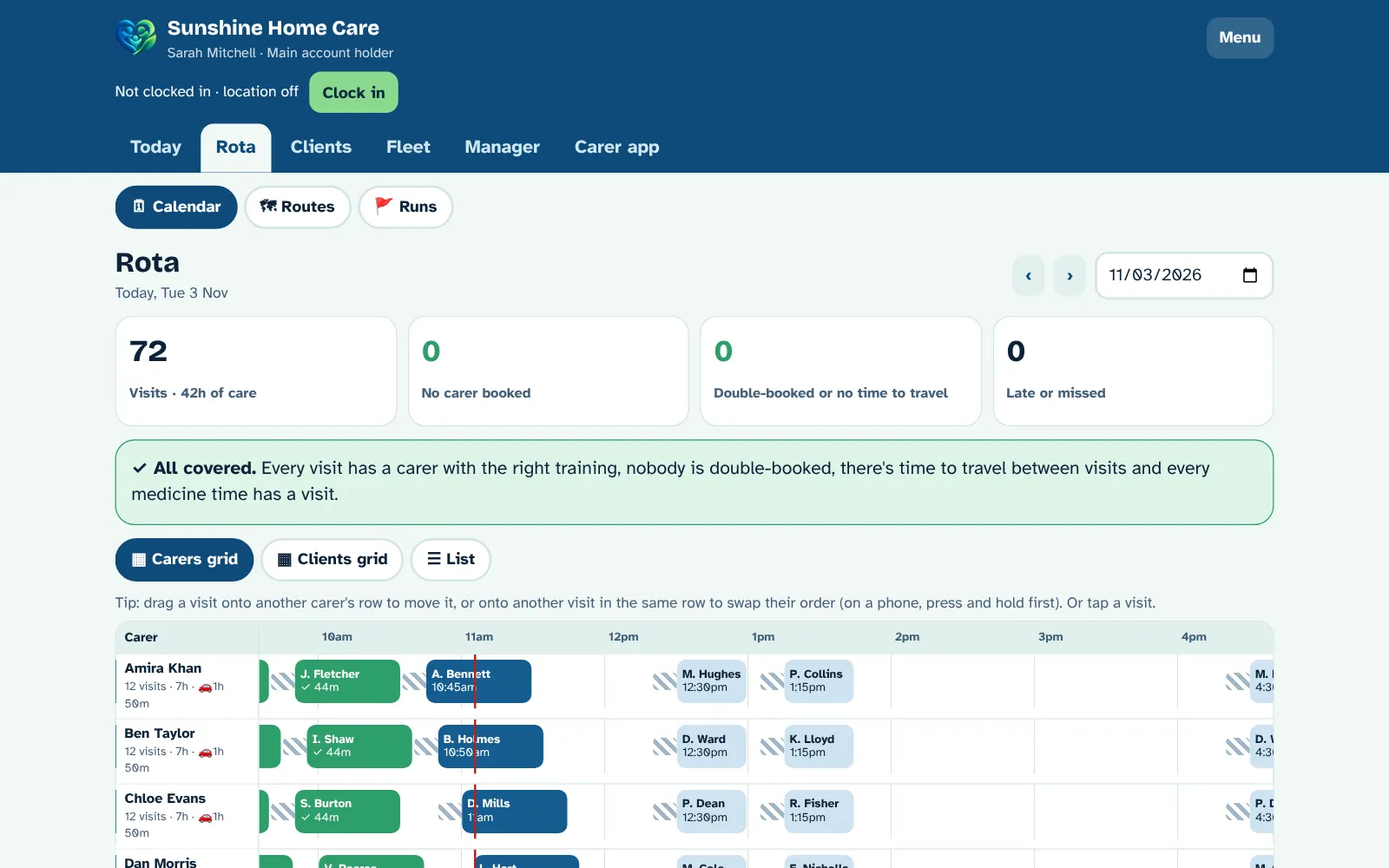
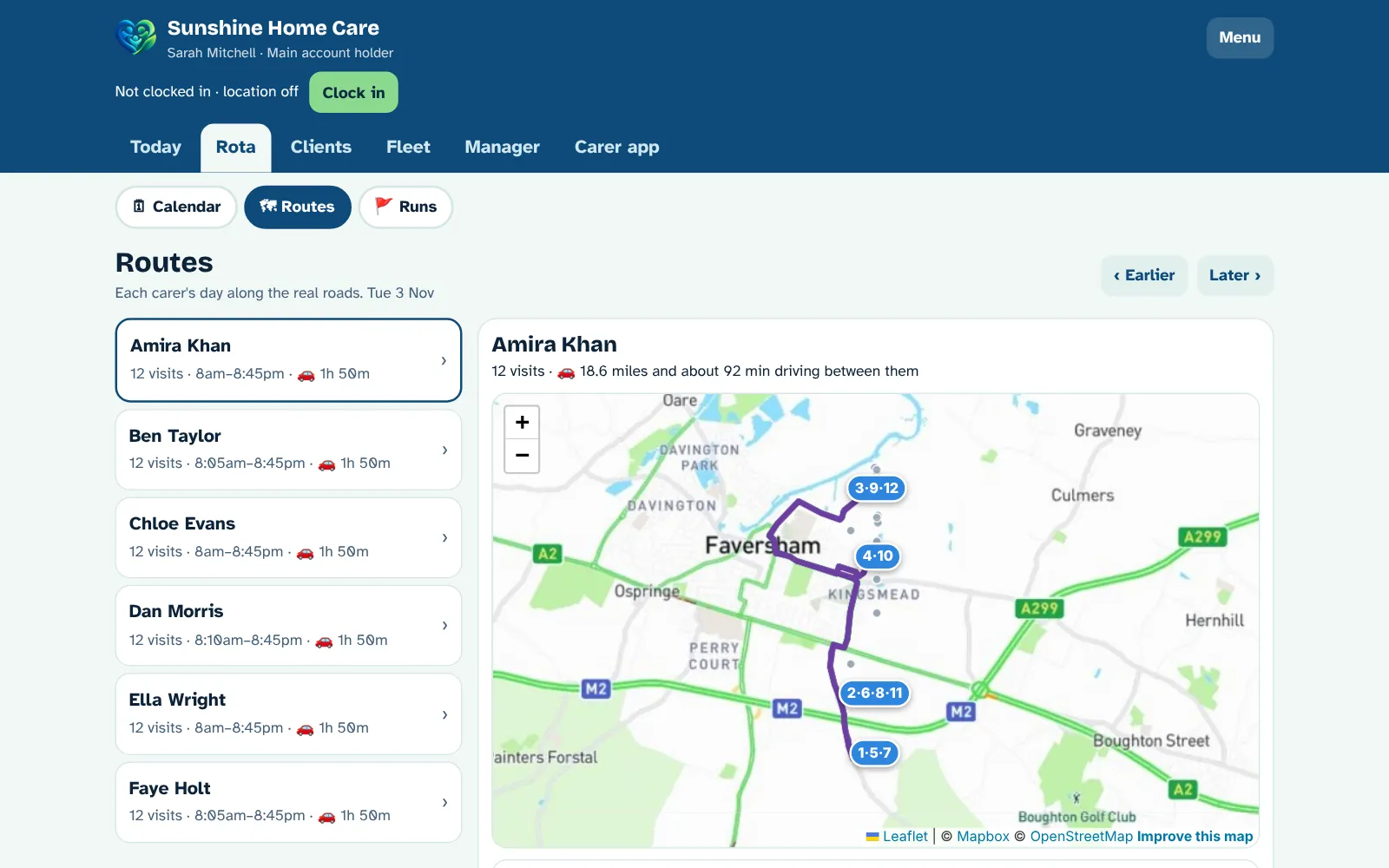
Each carer's day along the real roads
Rota → Routes shows any carer's day on a map, numbered in order, with the real road miles and driving time.
- Every carer's visits for any day, with how long they'll spend driving
- Tight gaps in red, where there isn't enough time to drive to the next visit
- Best order suggests a shorter way round and shows exactly which times would change, so you decide
- Breakfast, lunch and tea calls keep their own times: visits only swap within the same part of the day
- Who's closest: when you need cover, the hub suggests who is nearest now and whose round passes close by
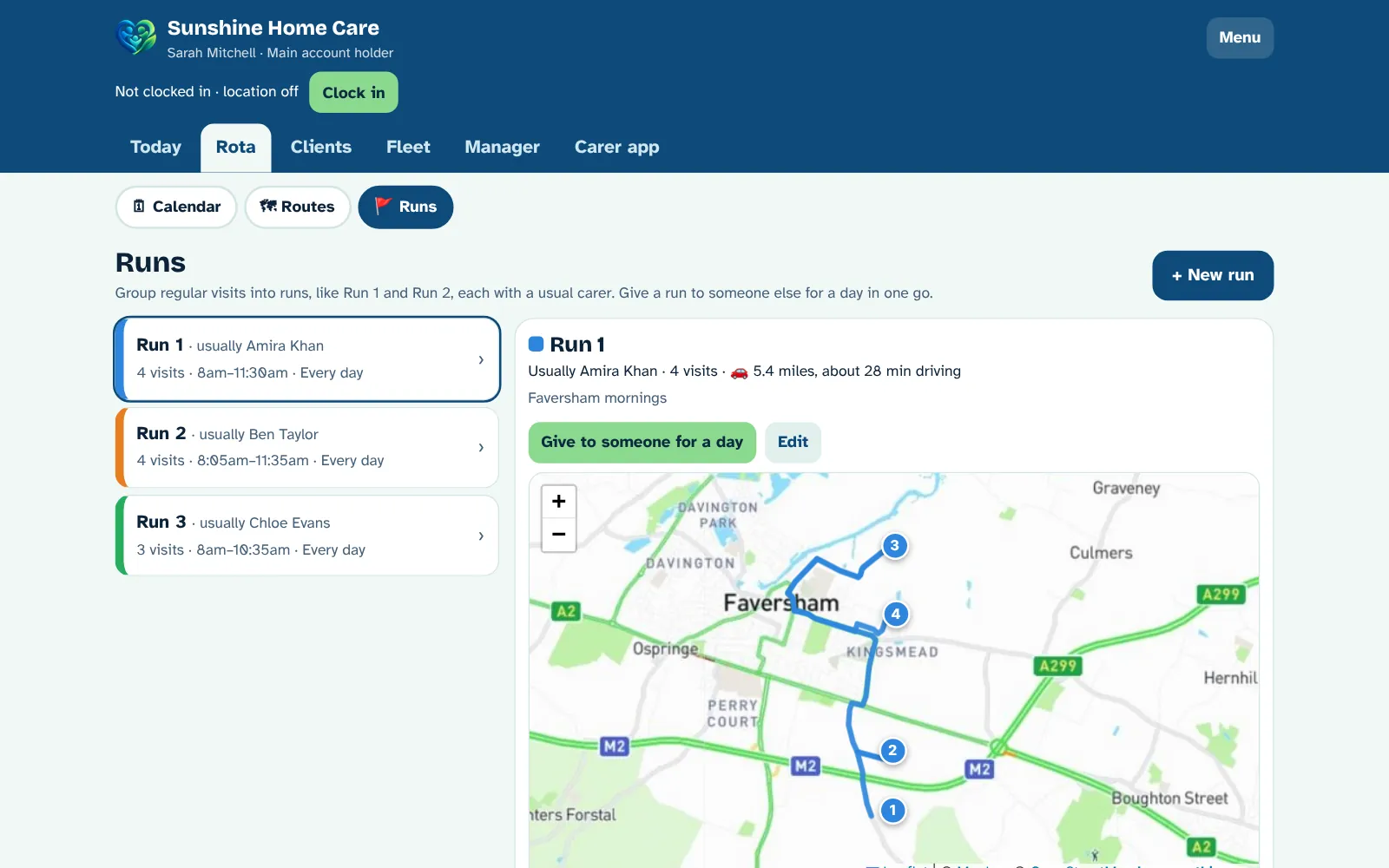
Runs, like Run 1 and Run 2
Group regular visits into runs, each with its own colour and a usual carer. When someone is off, give their whole run to someone else in one go.
- Numbered runs with their own colour, a usual carer and a note
- See each run on the map with its road miles and driving time
- Book the usual carer on every visit in the run in one tap
- Give a run to someone else for a day, and it's on their phone straight away
- A warning if two visits in a run overlap
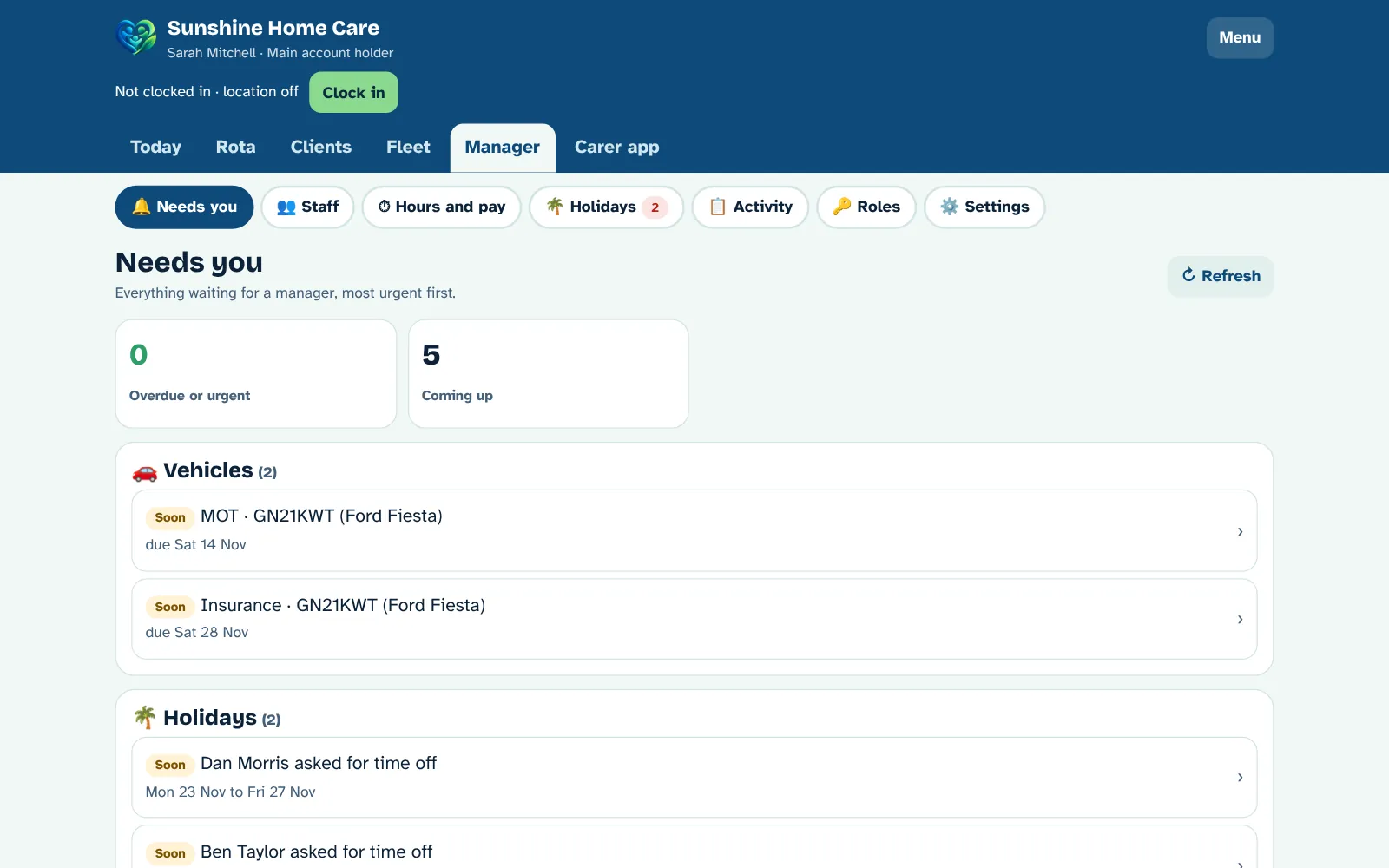
Anything that needs you, in one list
The Manager tab opens on Needs you: everything waiting for a manager, most urgent first. Staff, hours and pay, holidays, the activity log, roles and settings sit underneath, so the hub stays tidy.
- MOT, road tax, insurance and service dates coming up or overdue
- Open vehicle faults and driving licences that need checking
- Holiday requests and extra time requests waiting for an answer
- Medicines running low, and visits in the next week without enough carers
- Anyone who may have forgotten to clock out
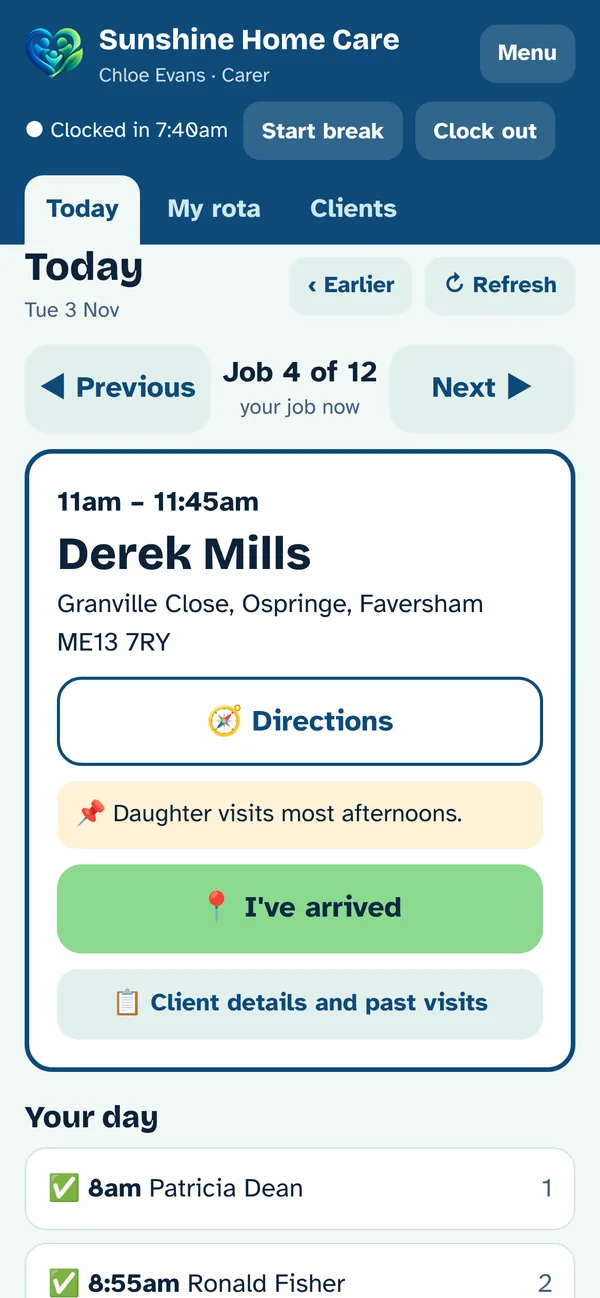
Simple enough for anyone
Built for carers who aren't confident with technology. Big buttons, plain words, and one job at a time.
- "Previous" and "Next" buttons, with the job they're on now in the middle
- Directions, the client's key notes and allergies, then "I'm on my way" and "I've arrived"
- Their partner's name and status on double-up visits
- "My rota" shows the next 7 days
- Works on any phone, and can be added to the home screen like an app
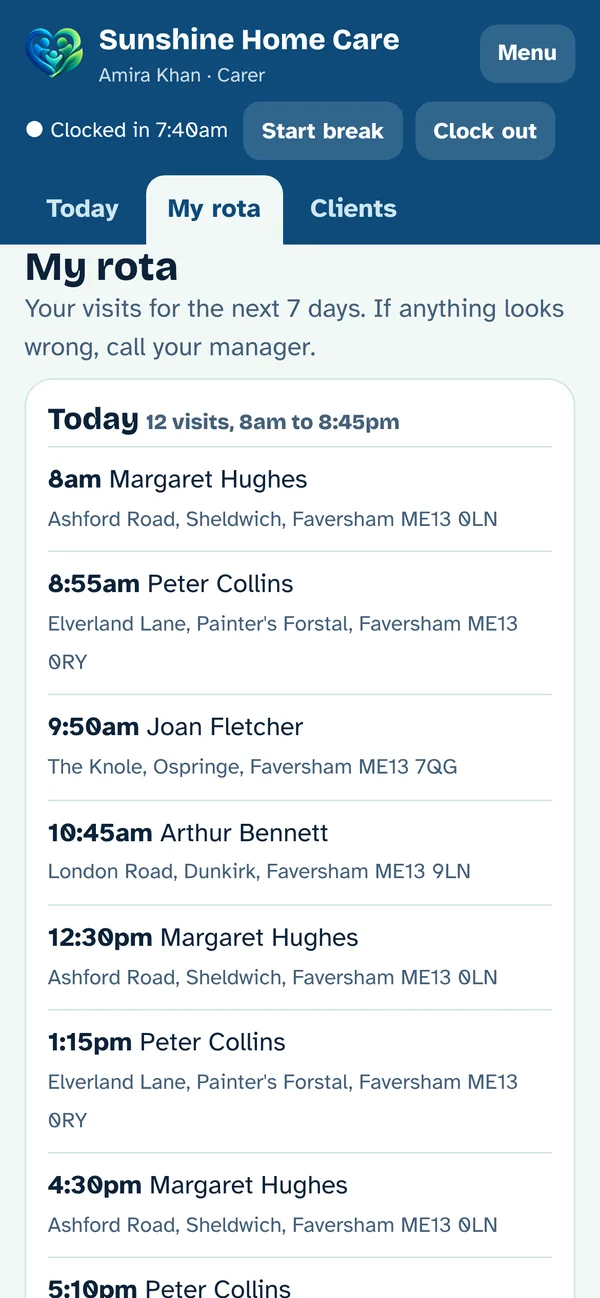
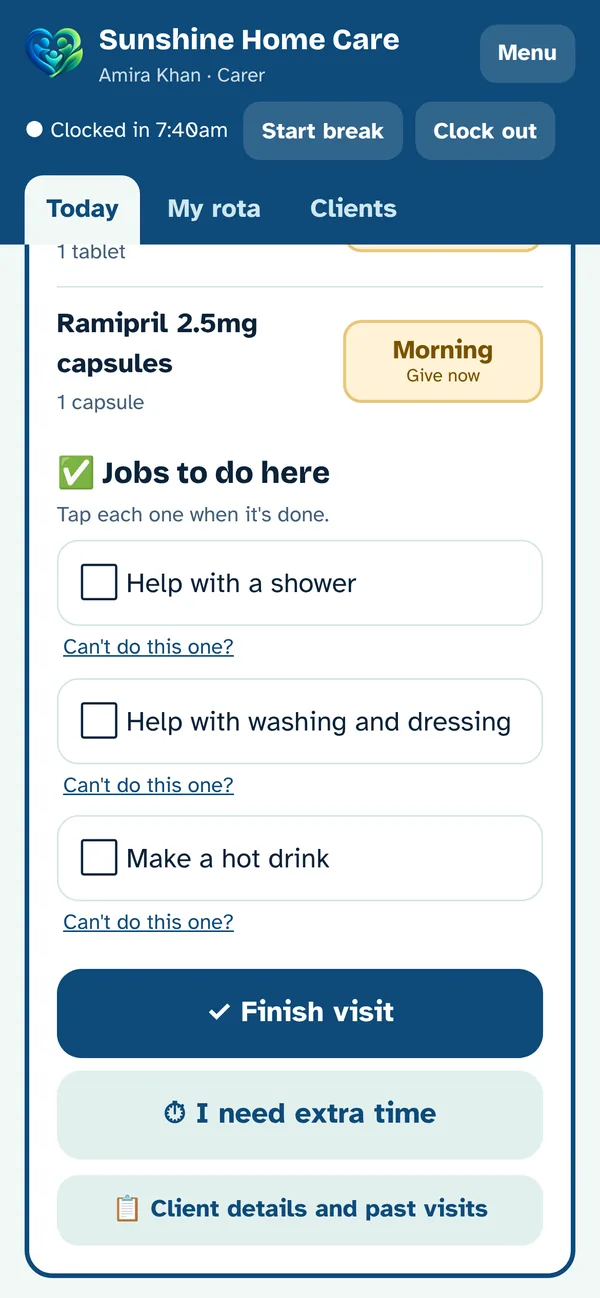
Medicines and care plan, ticked off as they go
Each client has their own checklist for each visit, set by the office, and their medicines for that visit.
- Medicines chosen from the NHS Dictionary of Medicines and Devices (dm+d), so every name and strength is right
- Each medicine recorded as given, refused or not given, with the real time and who did it
- Minimum gaps between doses and a daily limit, so nothing is given too soon
- Every checklist job ticked, or a reason given if it couldn't be done
- A visit note is needed before the visit can be finished
- Notes and checklists are locked once sent, and every carer can read past visits
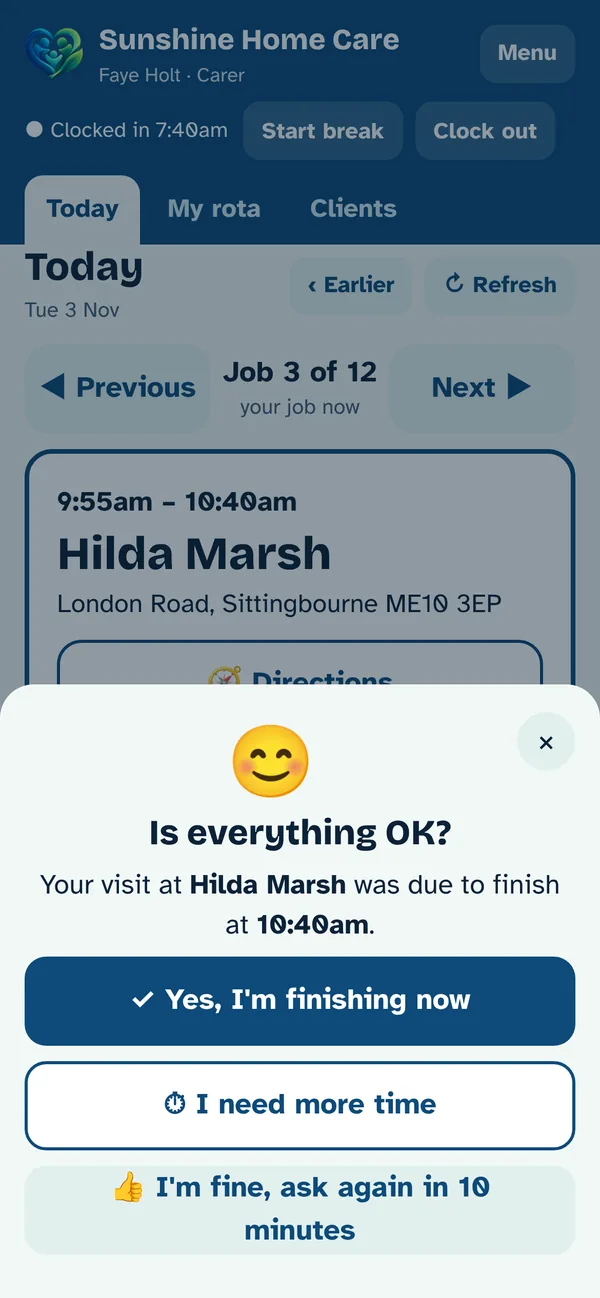
"Is everything OK?"
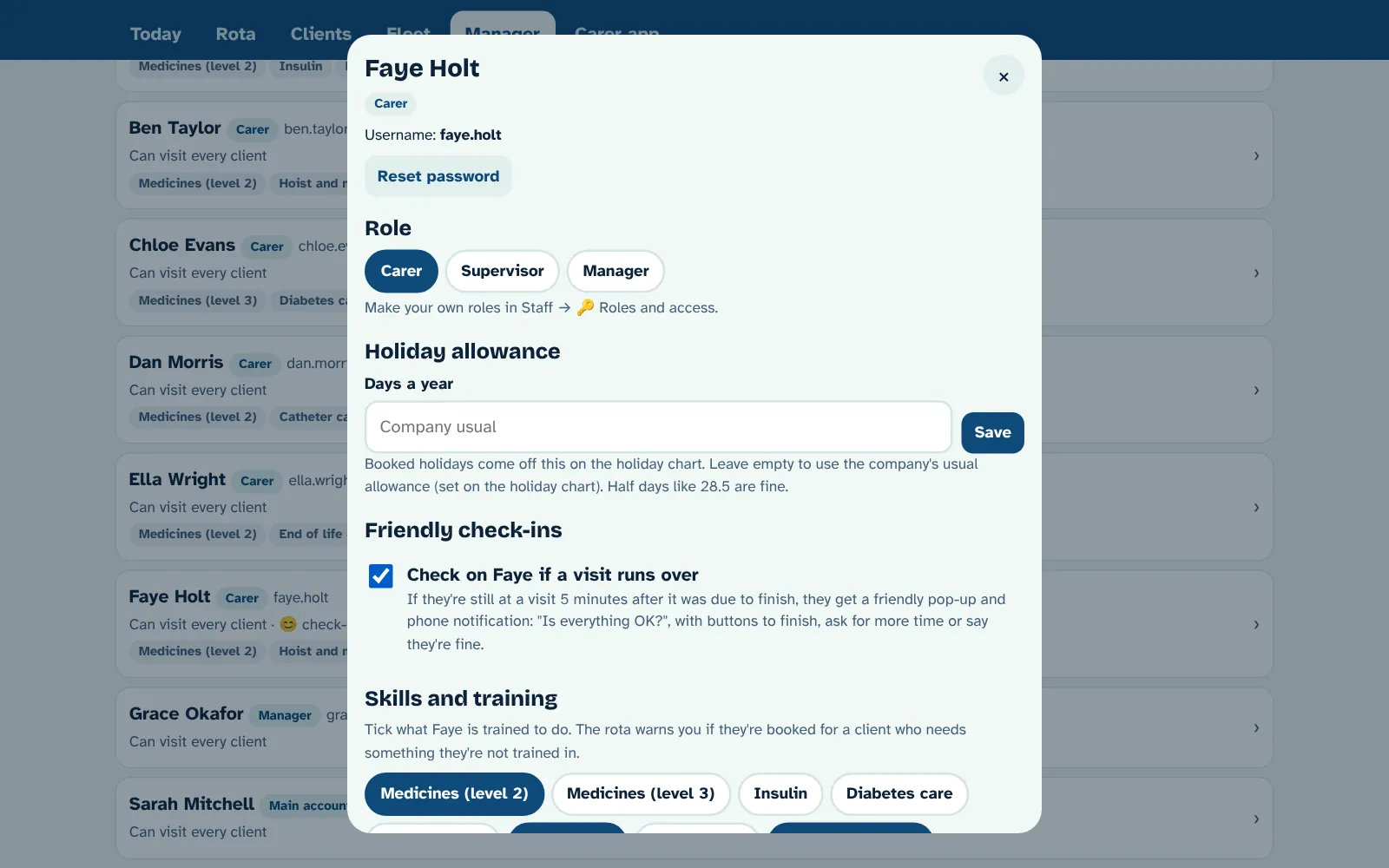
Switch on friendly check-ins for anyone you like. If they're still at a visit 5 minutes after it should have finished, their phone asks if they're OK.
- One tap to finish, ask for more time, or say they're fine
- Extra time requests go straight to a supervisor, who can push later visits back
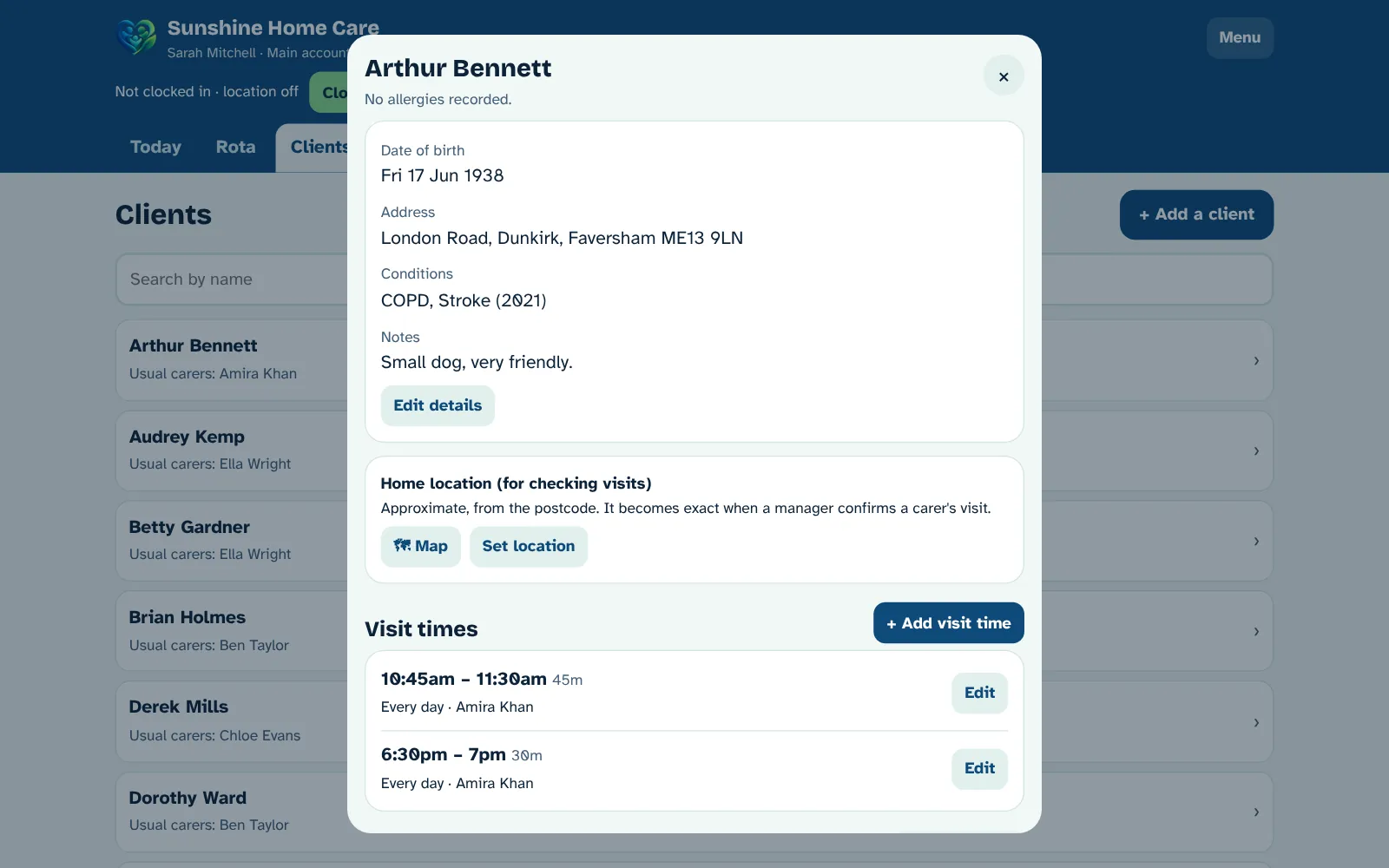
- Training records and skills for each carer, checked against each client's needs
- Clock in, breaks and clock out, with an optional location check at each visit
Everything written down, nothing quietly changed
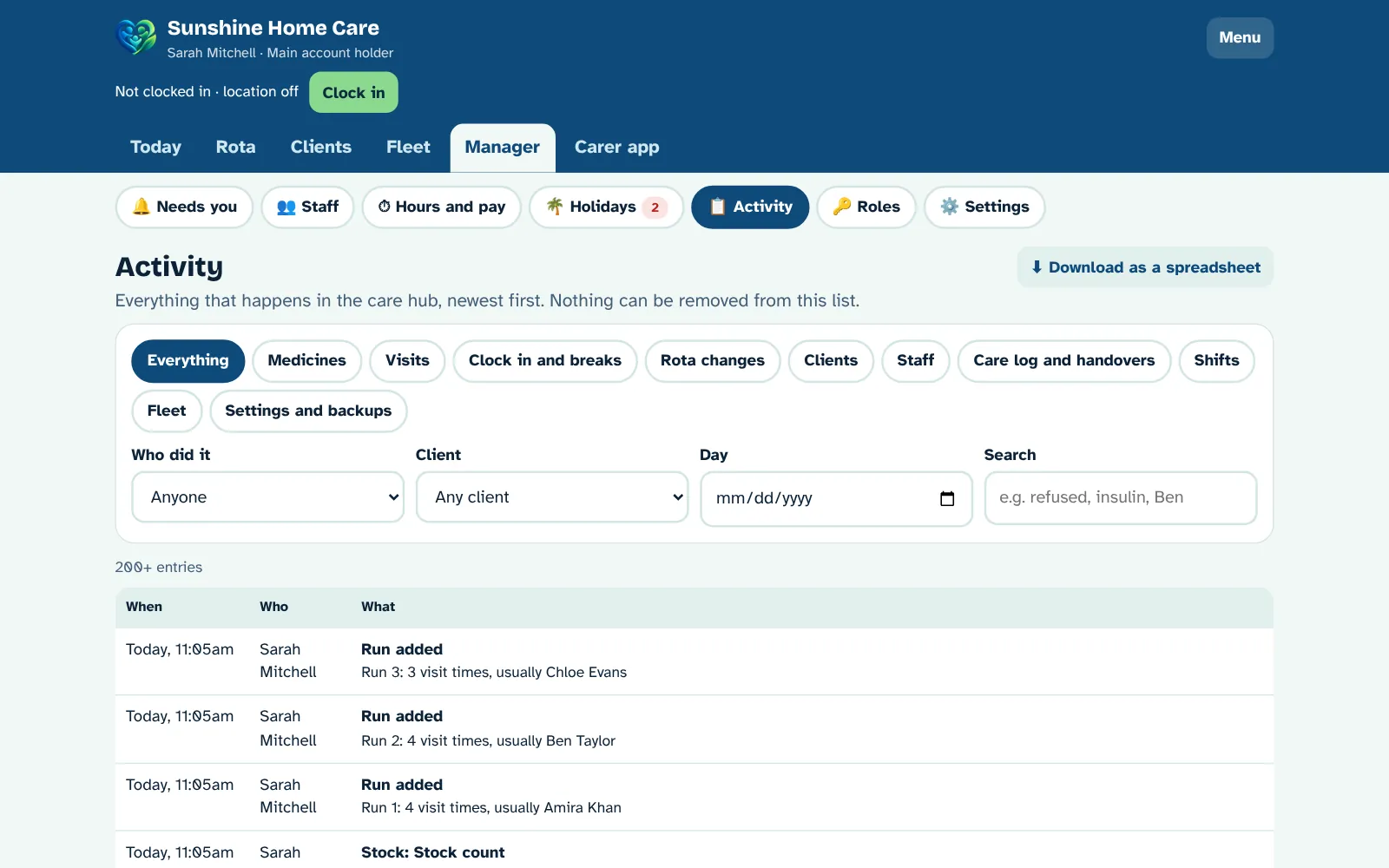
An activity log of everything that happens in the hub, newest first. Nothing can be removed from it.
- Filter by type, person, client or day, or search
- Download it as a spreadsheet
- Your own roles, like Supervisor or Senior carer, with exactly the access you choose
Your logo, your colours
Upload your logo and pick your header and highlight colours. Your team sees your brand across the office hub and the carer app.
- Your logo in the header, with a white box behind it if you need one
- Your own header and highlight colours, with a live preview
- Light and dark mode: it follows the setting on each computer or phone
Care plans anyone can follow
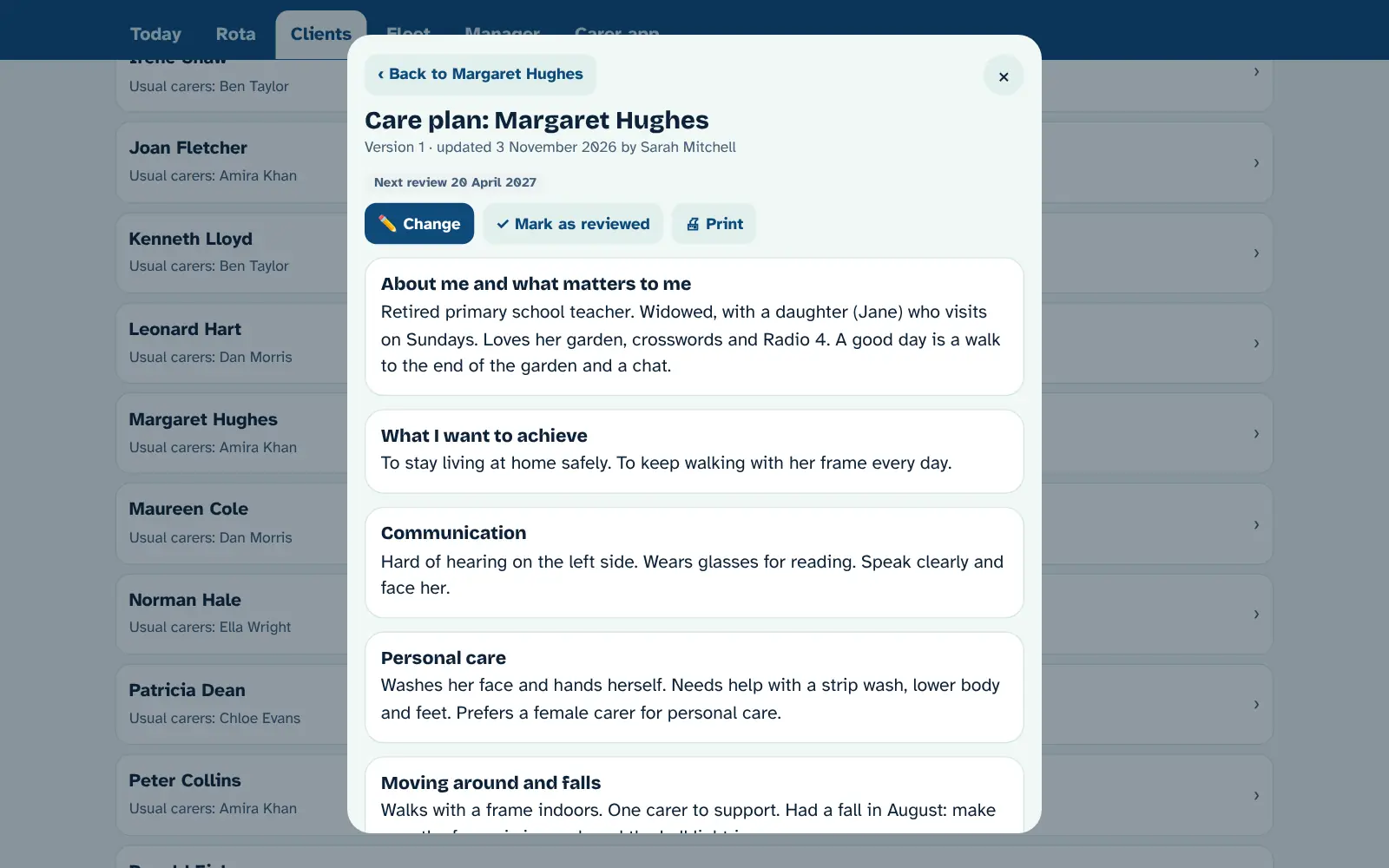
Short, headed parts like "About me", "Personal care" and "Moving around", written the way you'd tell a new carer. Carers read it on their phone at every visit.
- Every saved version kept, so you can see what it said on any date
- Review dates, with reminders in Needs you
- Ready-made assessments: falls, moving and handling, home, medicines, skin, eating and drinking, mental capacity
- Make your own forms in a few taps, with a risk level and review date
- Print any plan or assessment to sign
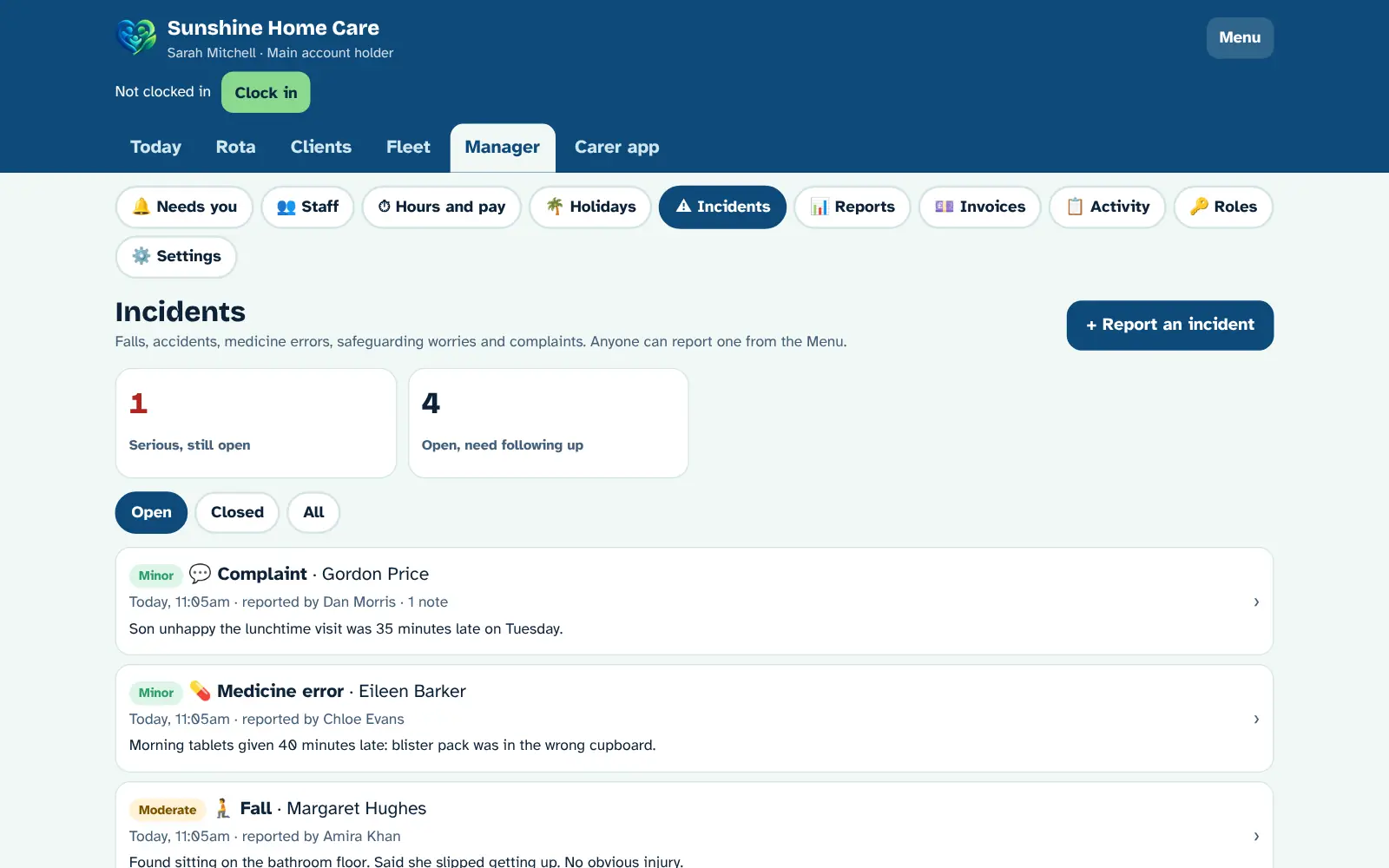
Report it in seconds, follow it through
Any carer can report a fall, injury, medicine error, safeguarding worry or complaint from the menu. Managers are told straight away.
- Big buttons: what happened, who, when and who's been told
- Follow-up notes, and close it with what was learned
- Serious incidents go to the top of Needs you
- Print a full report for CQC, the council or the family
- Nothing can be deleted
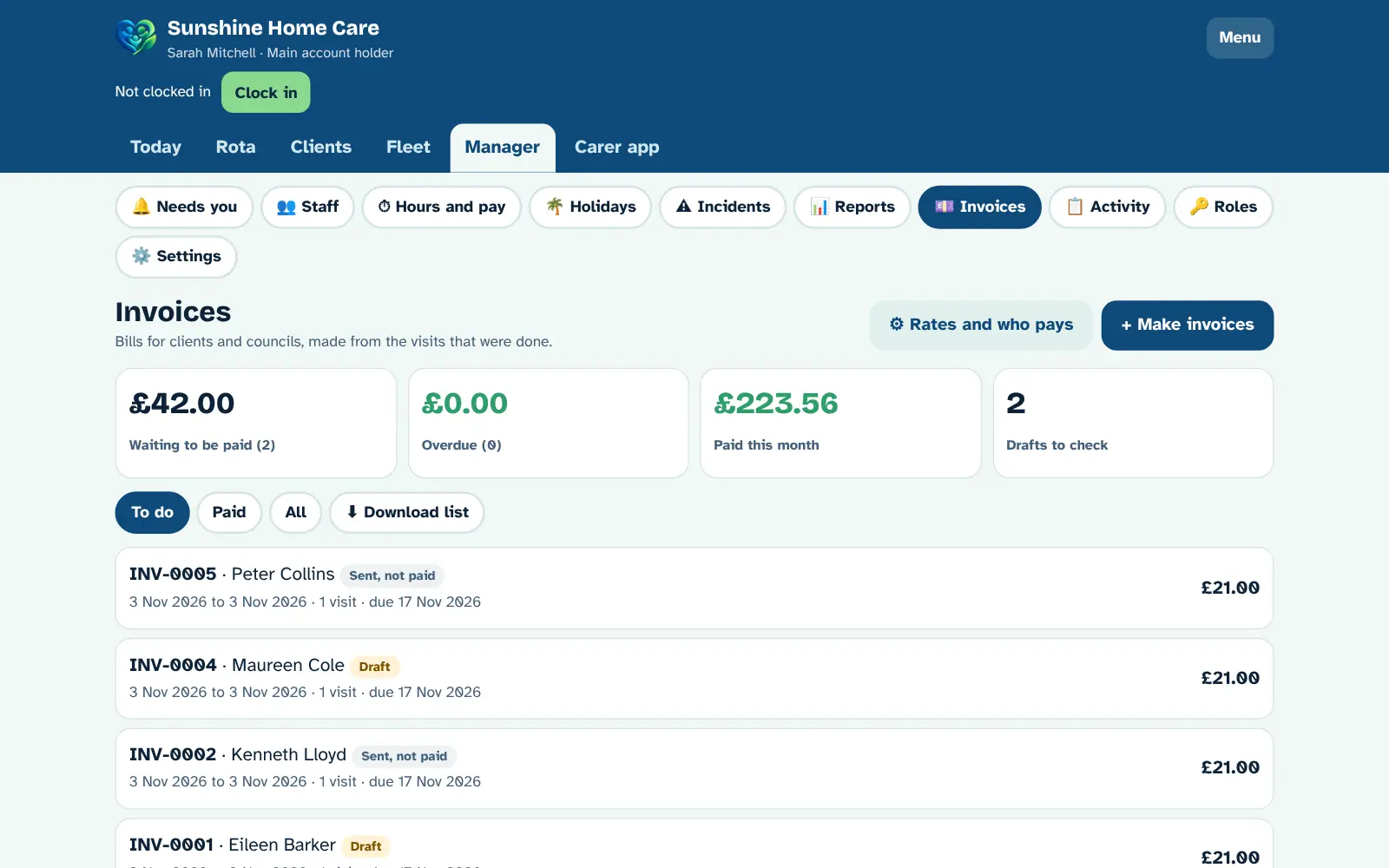
Invoices made from the visits that happened
Set your rates and who pays for each client, then make all your invoices in one go: one for each private client, and one for each council with every visit listed.
- Charge booked time or the real time spent, rounded how you like
- Weekend rates, and both carers on 2-carer visits
- A visit can never be billed twice
- Add mileage or a discount, print or save as PDF
- Mark as sent and paid, with overdue ones in Needs you
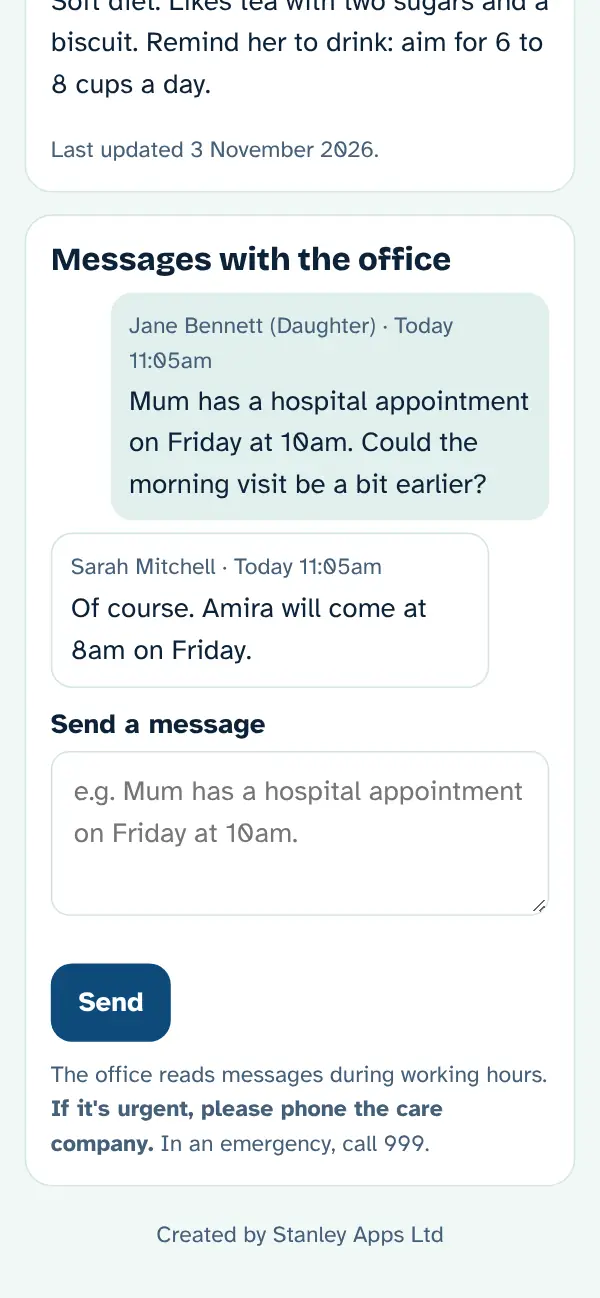
Peace of mind for families
Give a relative their own login. They see only what you tick, and only for their loved one, on their phone or computer.
- Who's coming and when, and when the carer is on the way
- Optional "On the way" emails: a live map of the carer that stops working when they arrive
- Carers' notes, medicines and the care plan, if you allow it
- Messages with the office, in one place
- Switch it off any time
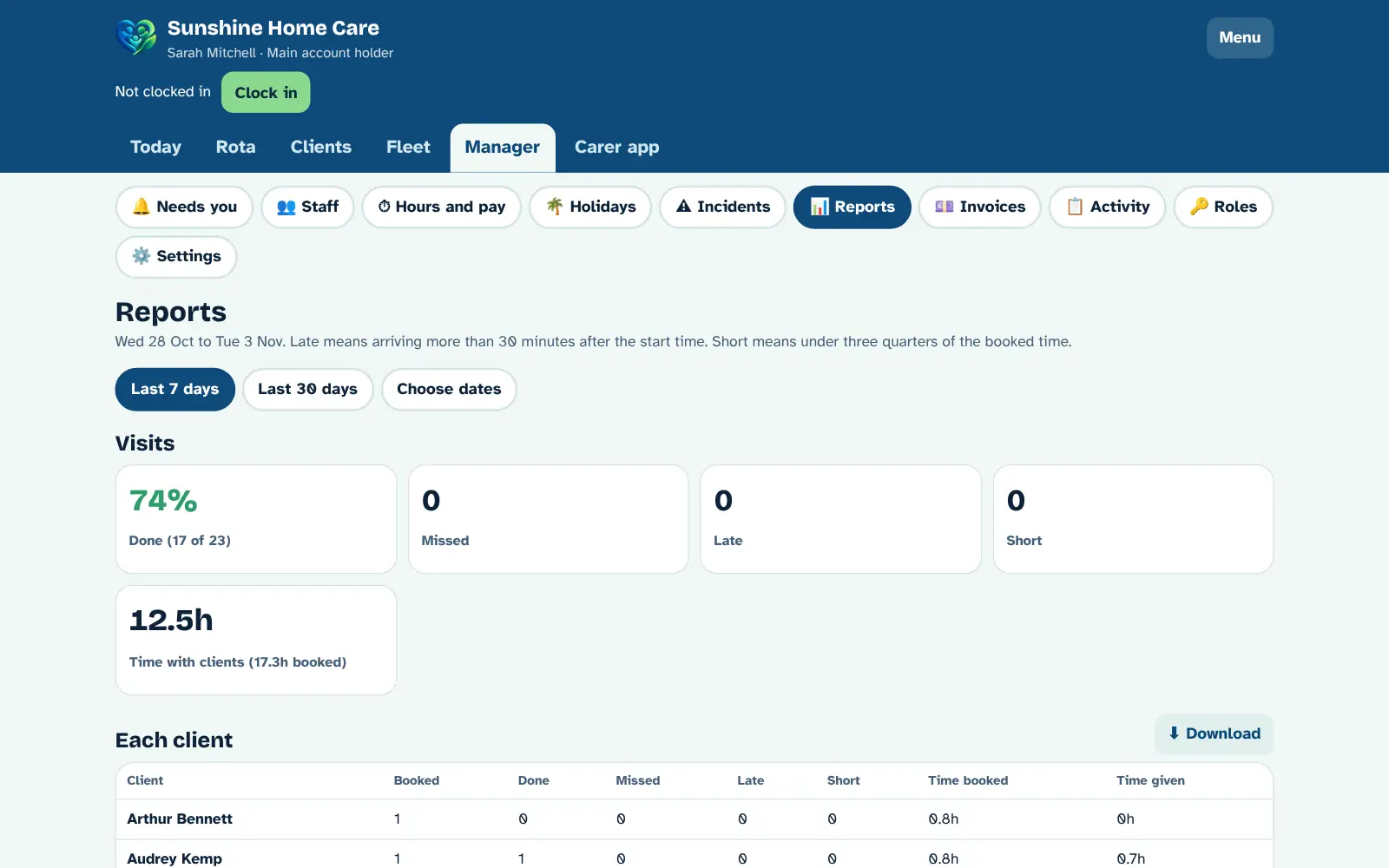
See how the service is really doing
Visits done, missed, late and short, for each client and each carer, plus medicines, hours worked and incidents, for any dates you choose.
- Last 7 days, last 30 days, or your own dates
- Missed and late visits listed, so you can follow them up
- Download as a spreadsheet
Built for care homes too
Choose "Care home" in Manager → Settings and the hub changes to fit: residents in units and rooms, staff shifts instead of visits, medicine rounds, a daily care log and shift handovers. No live map or travel times. Run both? Choose "Both" and get everything.
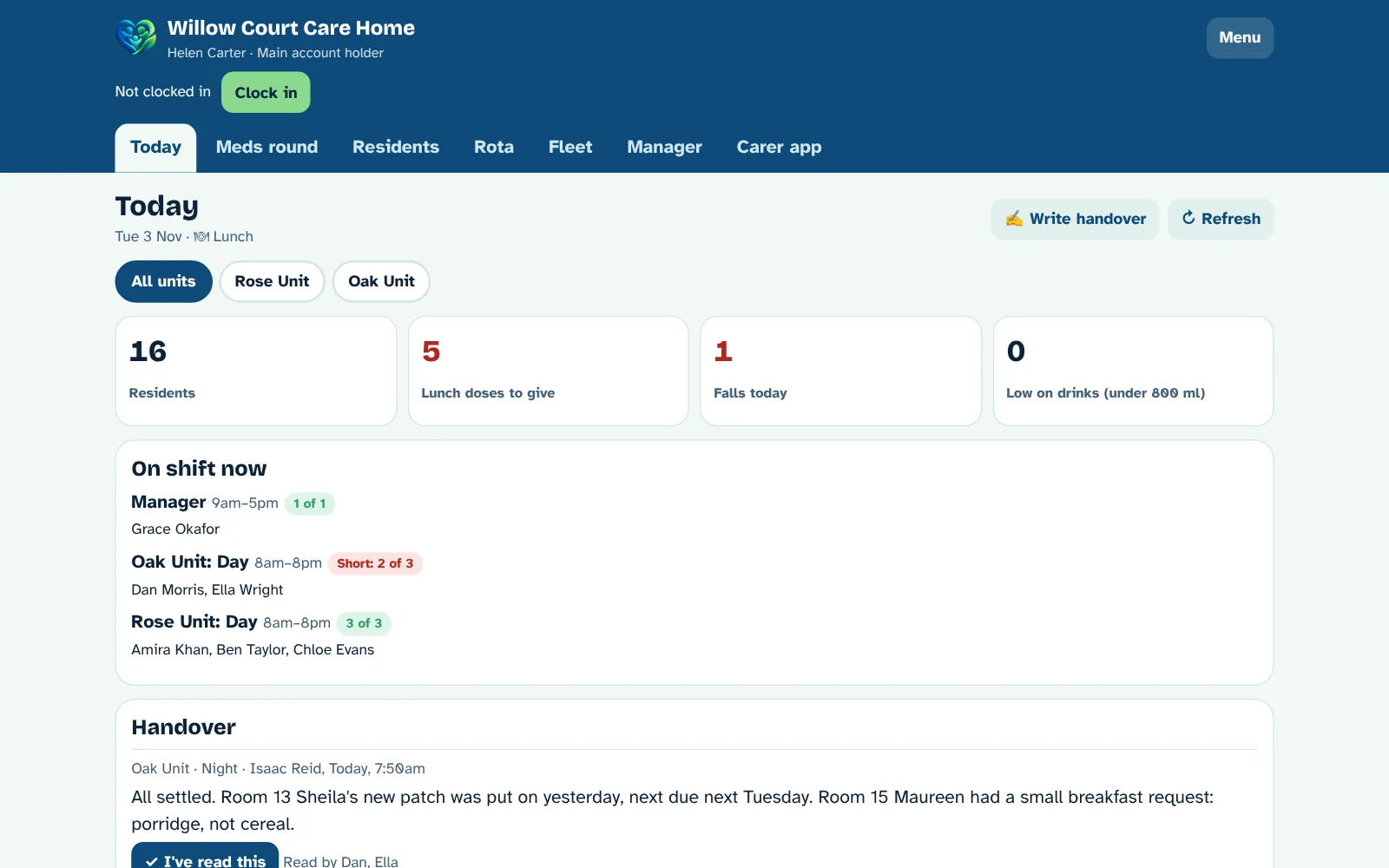
Your whole home on one screen
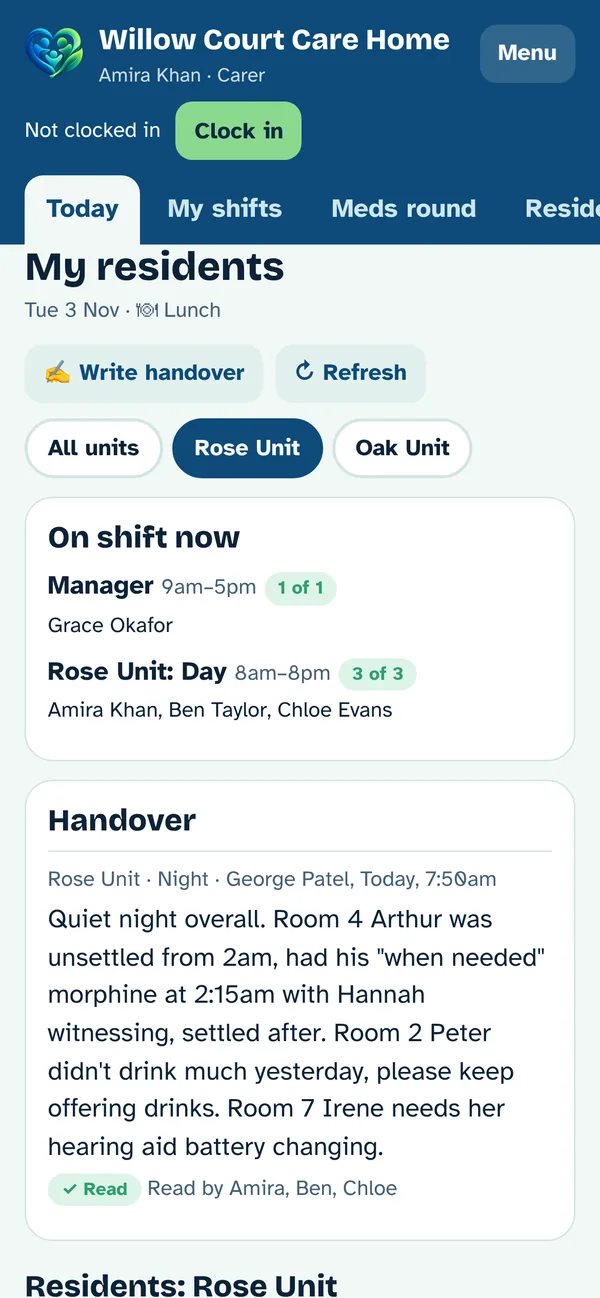
See every resident at a glance, unit by unit, with who is on shift and the latest handover.
- Who is on shift now, and any shift that is short of staff
- Each resident's doses to give, drinks so far, jobs done and their mood
- Falls today, and residents who are low on drinks
- The handover from the last shift, with "I've read this" so you know it was seen
- Staff see "My residents" for the unit they're working on
Room by room medicine rounds
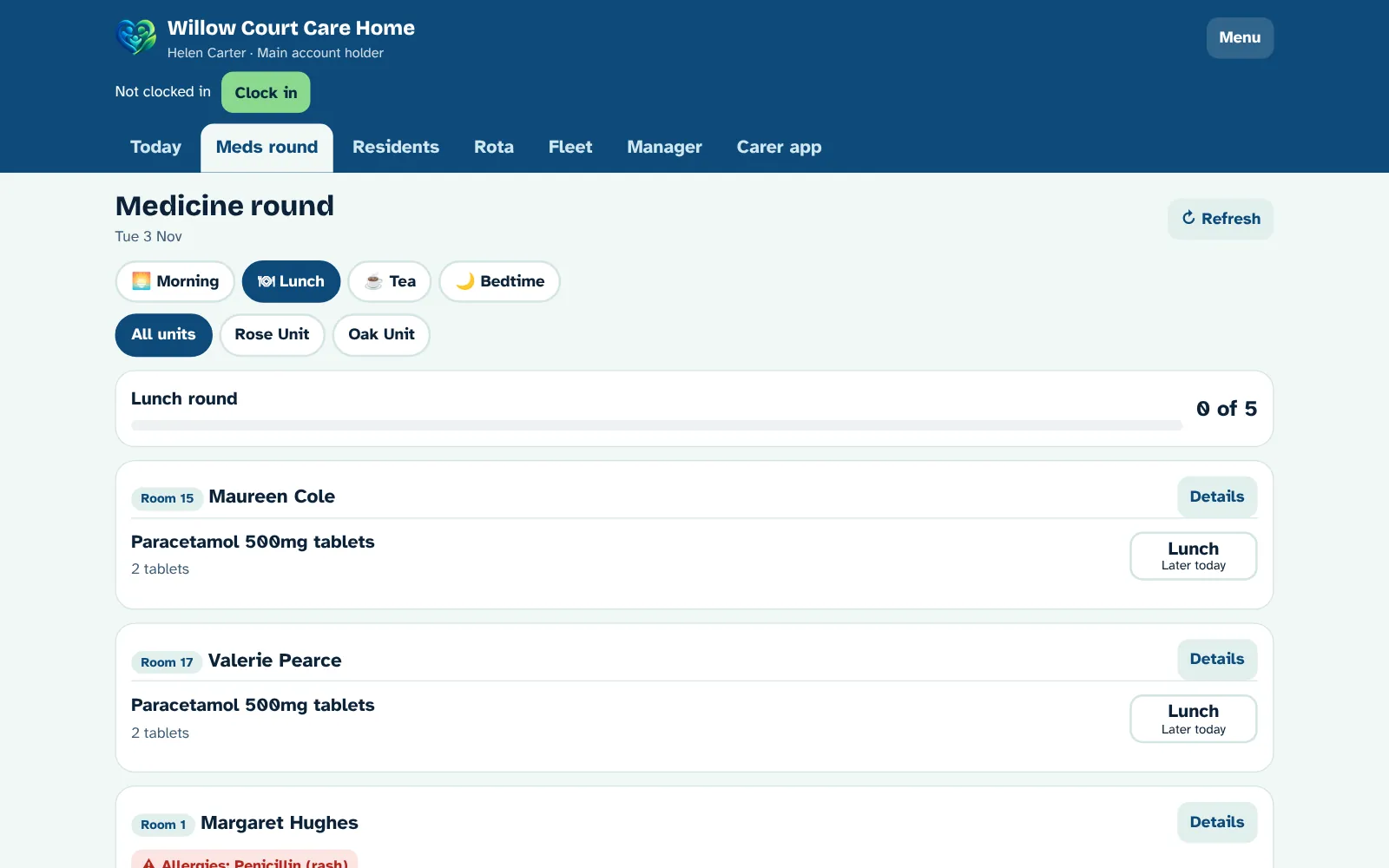
Pick the round and the unit, and go room by room. Every dose is recorded with the time and who gave it.
- Morning, lunch, tea and bedtime rounds, in room order
- A progress bar, so you can see how far the round has got
- "When needed" medicines a tap away
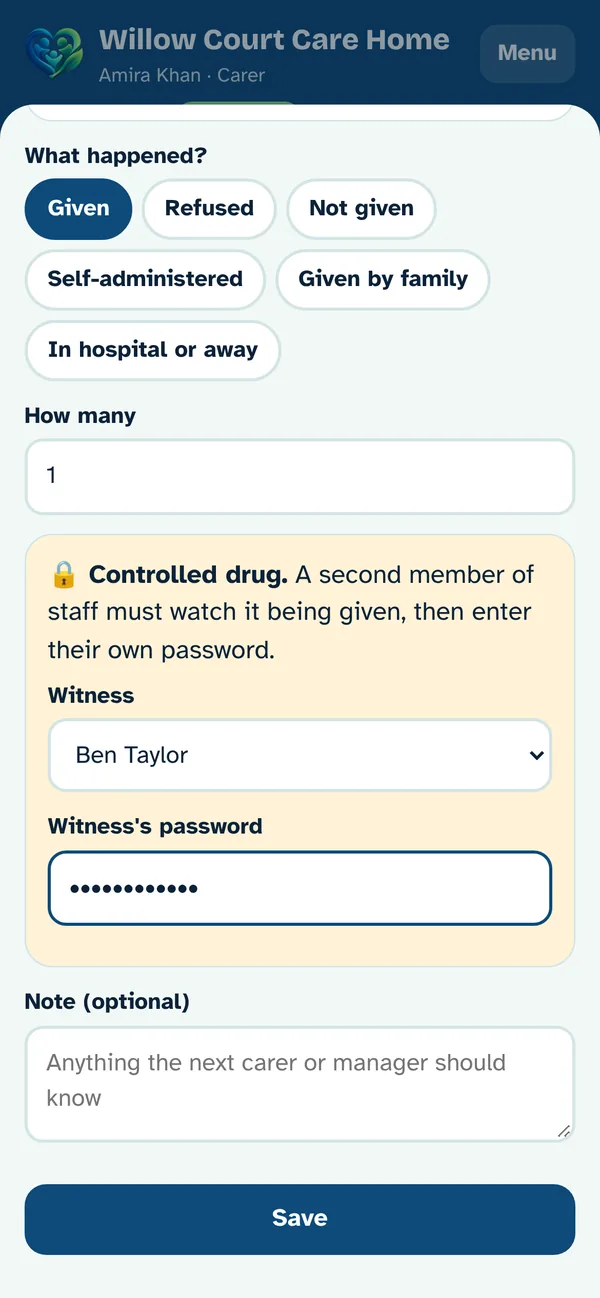
- Controlled drugs need a second member of staff to witness, with their own password
- Minimum gaps between doses, so nothing is given too soon
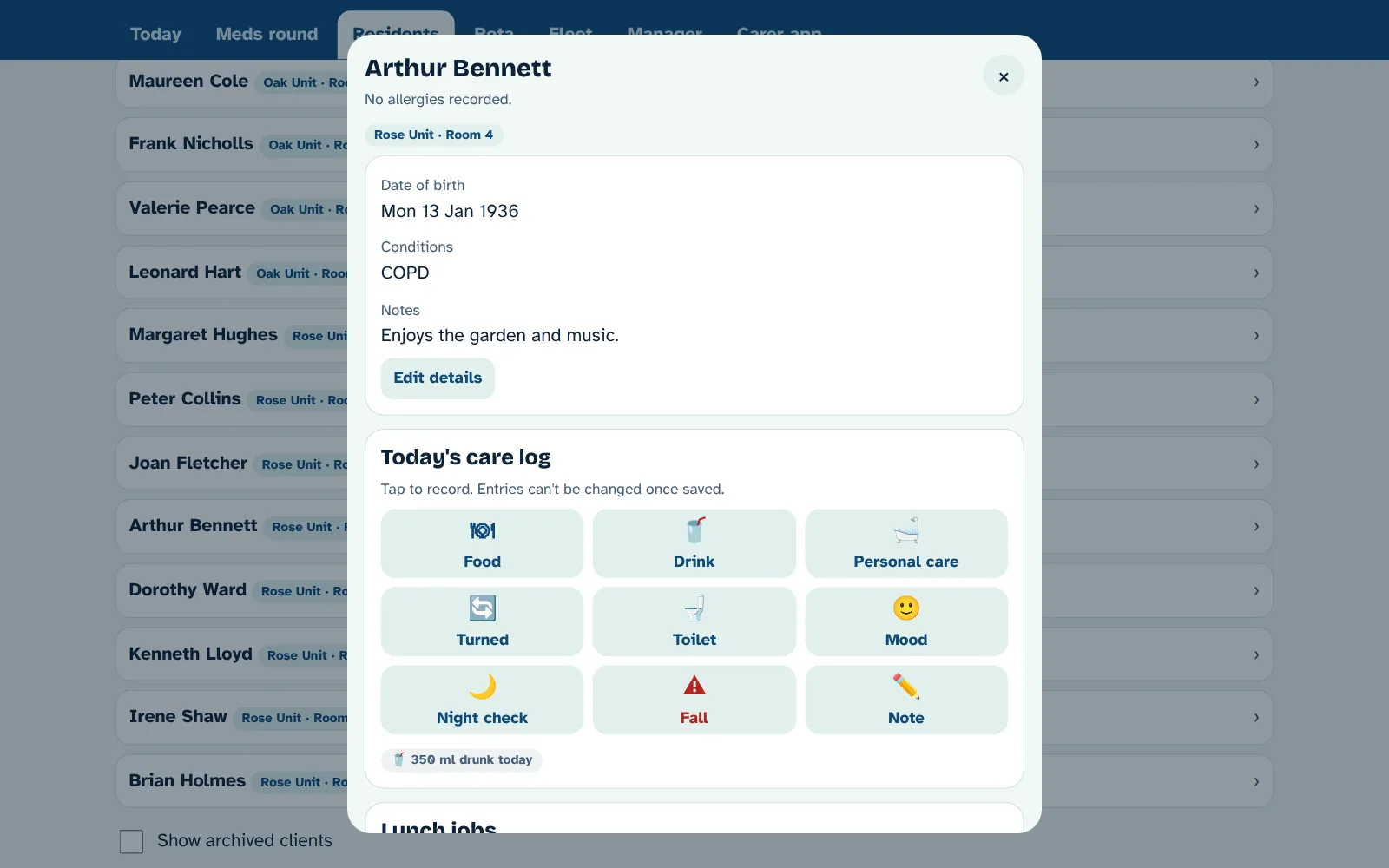
Record care in a couple of taps
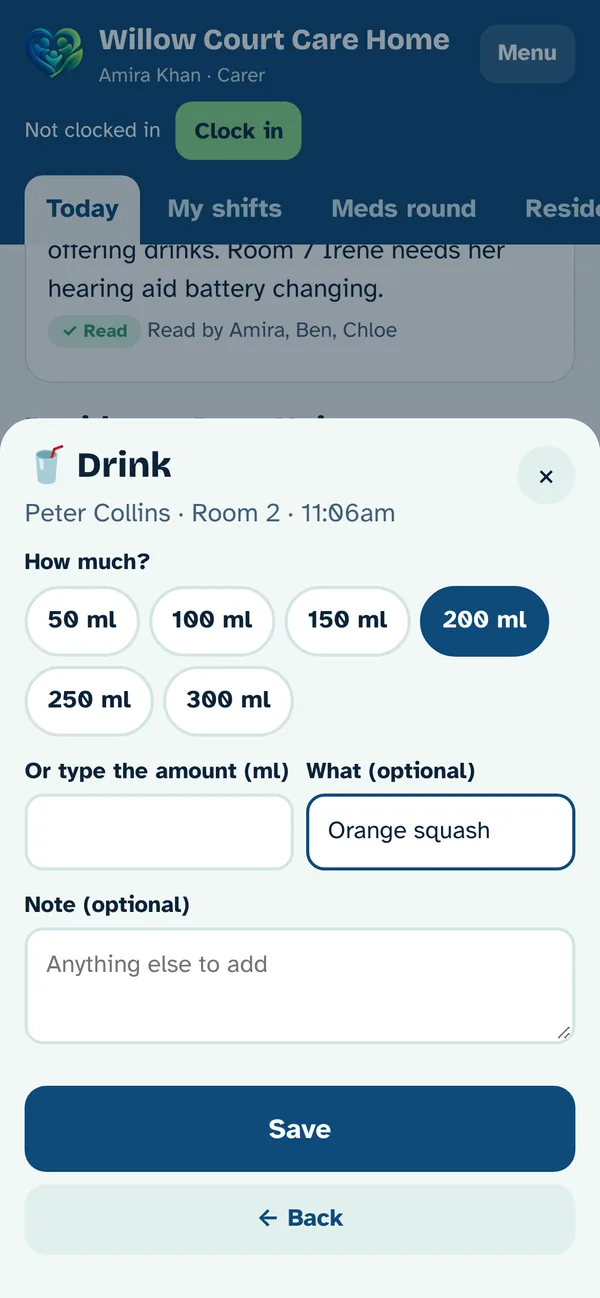
Big buttons on each resident's page for everything you need to record during the day and night.
- Food and how much they ate, and drinks in ml with a daily total
- Personal care, turning and repositioning, toileting, mood and night checks
- Falls, with managers told straight away
- Each resident's jobs for this part of the day, ticked off or with a reason
- Entries can't be changed once saved
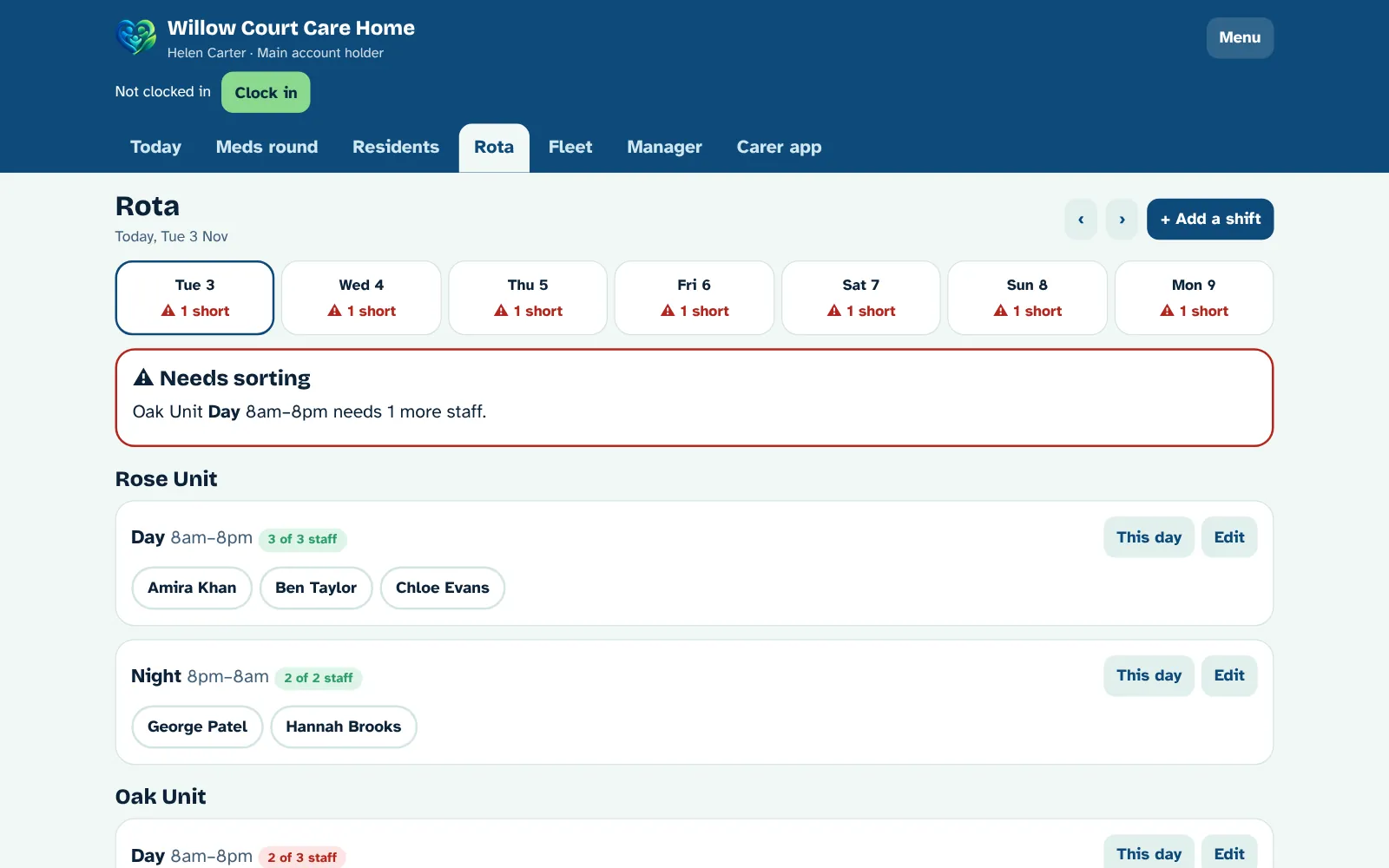
Shifts that cover every unit
Set your regular shifts once, like Day 8am to 8pm and Night 8pm to 8am, with how many staff each needs.
- A week at a glance, with any short shifts in red
- Change who's working for one day without touching the regular rota
- Warnings if someone is booked on two shifts at once
- Staff see their own shifts for the next 7 days
Every vehicle, every due date
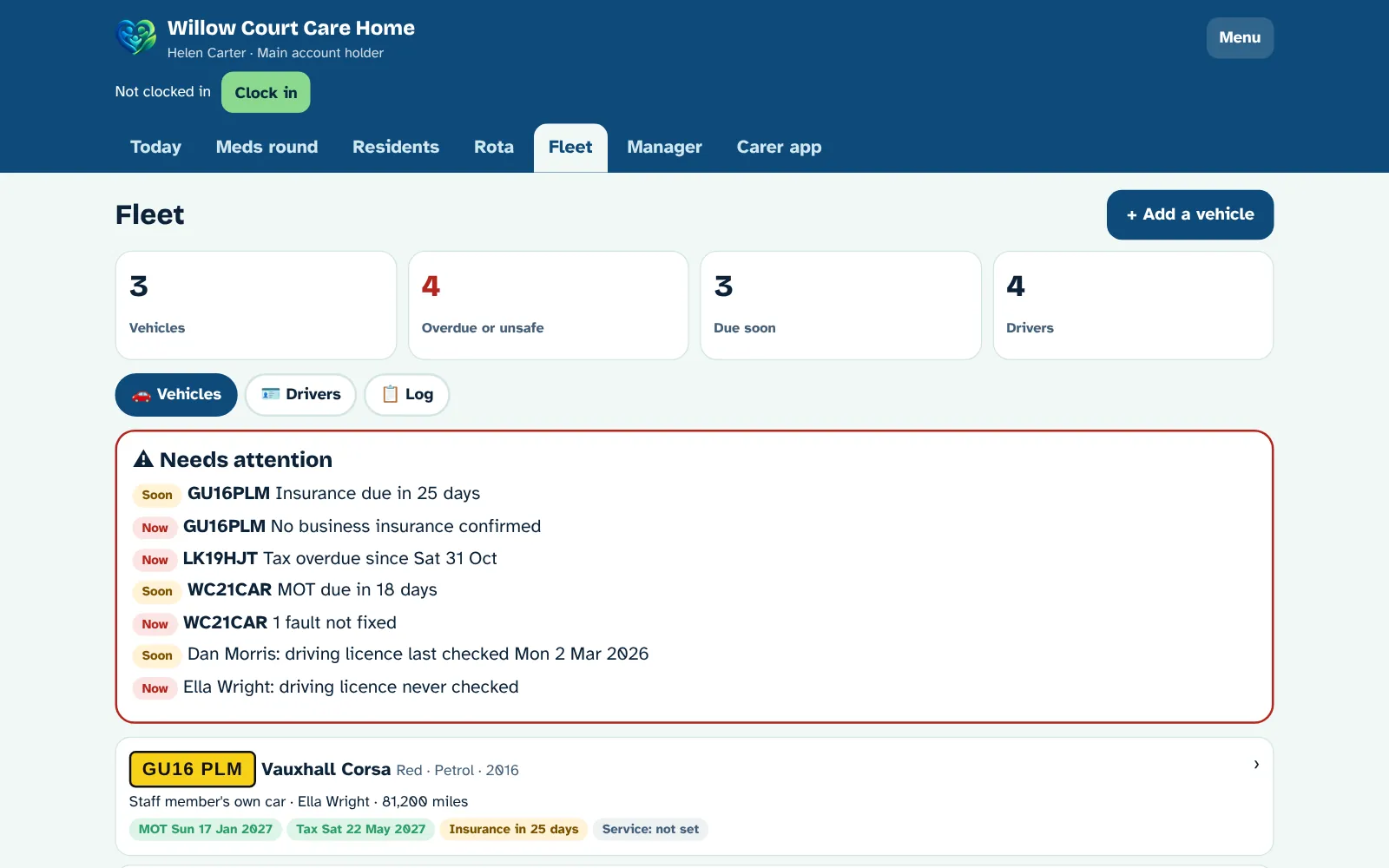
A Fleet tab for company cars, minibuses, leased cars and staff members' own cars used for work. For home care and care homes.
- Add each vehicle by registration, with make, model, colour, fuel and year
- MOT, road tax, insurance and service dates, with warnings 30 days before
- Who drives what, mileage and business miles, fuel and service costs
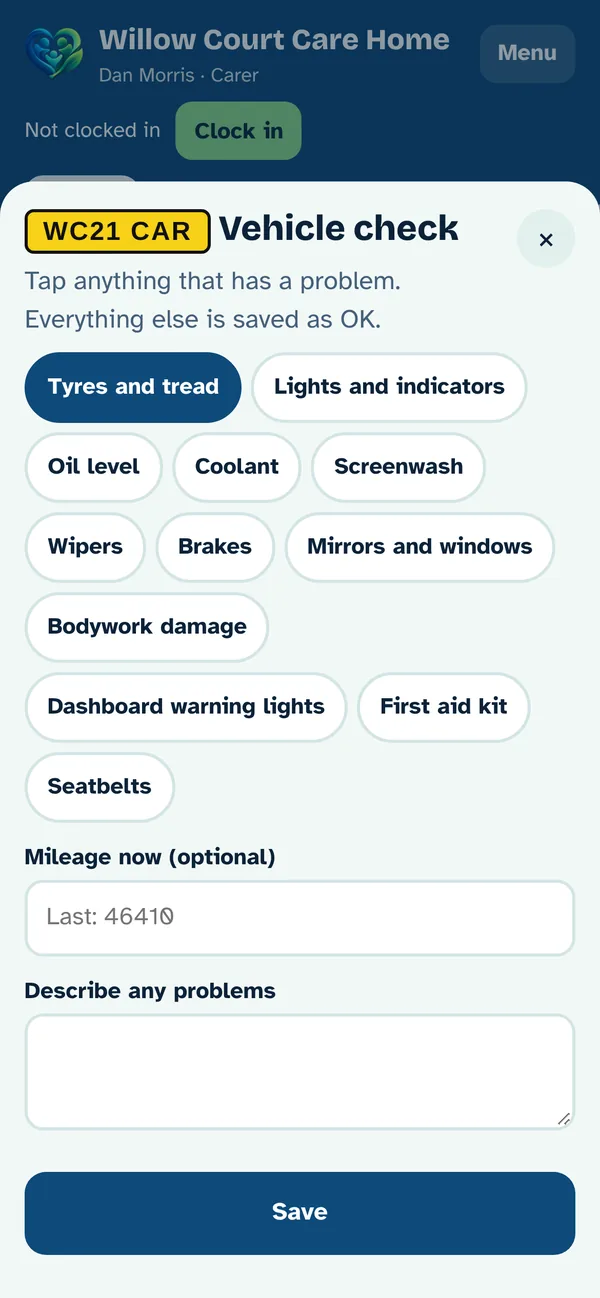
- Vehicle checks on the phone: tap anything with a problem, and managers are told
- Faults stay open until a manager marks them fixed
- Staff own cars: check they have business use insurance
- Driving licence checks, points and expiry dates for every driver
Everything it does
All of this is in the care hub today, for home care, care homes, or both.
Rota and visits
- Regular weekly visit times for each client
- One-day changes and cancellations
- Carers grid and clients grid
- Drag and drop, or tap to move
- Reorder a carer's visits
- Real road drive times between visits
- Routes: each carer's day on a map
- Best order suggestions
- Runs (Run 1, Run 2…) with a usual carer
- Who's closest when you need cover
- Double-up (two carer) visits
- Warnings for clashes, travel and training
- Late and missed visits flagged
Live view
- Who's on shift, at a job or on the way
- Time at the current job, with a counter
- Job number, like "Job 4 of 12"
- Distance to the next job
- Live map on Today, with the road route to each carer's next client
- Arrival times with live traffic, and a Traffic switch
- Tap a carer to see their whole day
- Clock in, breaks and clock out
Carer phone app
- One job at a time, with Previous and Next
- Directions to each client
- Client notes and allergies up front
- "My rota" for the next 7 days
- Keeps working with no signal, then sends everything when signal is back
- Ask for extra time
- Friendly "Is everything OK?" check-ins
- Phone notifications
Medicines (eMAR)
- Medicines from the NHS Dictionary of Medicines and Devices (dm+d)
- Given, refused or not given, with reasons
- The real time each dose was given
- Minimum gap between doses and daily limits
- Override with a reason, for those allowed
- "When needed" medicines
- Controlled drugs witnessed by a second member of staff
- Stock counts and low stock warnings
- Alerts for late or missed doses
Clients and care plans
- Client details, conditions and allergies
- GP and pharmacy from the NHS list
- A visit checklist for each client, set up when they're added
- Care needs checked against carers' skills
- Full visit history for every carer to read
- "Not allowed to visit" list for each client
Staff and safety
- Training records and skills for each carer
- Your own roles with chosen access
- Hand a visit over to someone else
- Visit notes required to finish
- Notes and checklists locked once sent
- Activity log with filters and spreadsheet download
- Reset passwords and switch off access instantly
- "Needs you" list for managers
- Your logo and colours, light and dark mode
Care homes
- Residents in units and rooms
- Staff shift rota with short-staffed warnings
- Medicine rounds, room by room
- Daily care log: food, drinks, personal care, turns, toileting, mood, night checks
- Falls recorded, with managers told
- Shift handovers with read receipts
- Jobs for each part of the day
Fleet
- Vehicles by registration
- MOT, tax, insurance and service due dates
- Warnings before anything is due
- Mileage, fuel and service records
- Phone vehicle checks and fault reports
- Staff own cars and business insurance
- Driving licence checks and points
Care plans and assessments
- Care plans in short headed parts
- Every version kept
- Review dates and reminders
- 7 ready-made assessments
- Make your own forms
- Print to sign
Incidents
- Falls, injuries, medicine errors, safeguarding and complaints
- Reported from any phone in seconds
- Managers told straight away
- Optional photos, with your own photo rules
- Body maps for bruises, wounds and sore skin
- Follow-up notes and lessons learned
- Printable reports
Invoices
- Rates for private clients and councils
- Invoices made from finished visits
- Weekend rates and 2-carer visits
- Never billed twice
- Print or PDF, sent and paid, overdue reminders
- Downloads ready to import into Xero or QuickBooks
Messages and training
- Announcements to the whole team, with read receipts
- Private messages between each carer and the office
- Training records with renewal dates
- Reminders before training runs out
- Screen stays on while carers are clocked in
Staff files
- DBS, right to work, references, ID and contract checks
- Reminders before anything runs out
- Supervisions, appraisals and spot checks
- Signatures on screen
- Payroll import file for Sage, Xero Payroll or BrightPay
Family
- Family logins for one person
- You choose what they see
- Visits, notes, medicines and care plan
- Messages with the office
- "On the way" emails with a live map, switched on per client
Reports
- Visits done, missed, late and short
- Each client and each carer
- Medicines, hours and incidents
- Download as a spreadsheet
Support, 24/7
- Message, email or phone, 9am to 5pm Monday to Friday
- Phone any time out of hours, 24/7
- We set up your account and train your team
- Updates and nightly backups included
Simple pricing
One price for your whole team, not per carer, client or bed. Pay yearly and get 2 months free.
Team
or £1,490 a year
For care companies with up to 15 carers. Monthly, cancel any time.
Try it free for 7 daysEnterprise
per building, or £2,490 a year
For bigger teams, care homes and groups with more than one building. 12-month contract.
Talk to us| What you get | Free | Team | Enterprise |
|---|---|---|---|
| Carers | Up to 3 | Up to 15 | Unlimited |
| Clients or residents | Up to 10 | Unlimited | Unlimited |
| Buildings or branches | 1 | 1 | As many as you need |
| Rota, visits, clock in and out | ✓ | ✓ | ✓ |
| Carer phone app | ✓ | ✓ | ✓ |
| Medicines charts (eMAR) and controlled drugs | ✓ | ✓ | ✓ |
| Care plans, body maps and incidents | ✓ | ✓ | ✓ |
| Works with no phone signal | ✓ | ✓ | ✓ |
| Home care, care homes and fleet | ✓ | ✓ | ✓ |
| Family page | – | ✓ | ✓ |
| Family WhatsApp alerts | – | ✓ | ✓ |
| "On the way" live tracking emails | – | ✓ | ✓ |
| Route map, drive times and "Who's closest" | – | ✓ | ✓ |
| Invoices, hours and pay | – | ✓ | ✓ |
| Training, supervision and staff checks | – | ✓ | ✓ |
| Reports and inspection evidence | – | ✓ | ✓ |
| Your own logo and colours | – | ✓ | ✓ |
| One view of all your buildings | – | – | ✓ |
| Signed contract (instead of online terms) | – | – | ✓ |
| Support | Help button and email | 24/7 UK phone line, plus WhatsApp and email | 24/7 UK phone line, plus WhatsApp and email |
- The 7-day free trial needs a card. You won't be charged if you cancel before it ends.
- No VAT is added to our prices.
- If you stop paying, your account moves to Free and your records are kept.
- We'll always help you get set up, on any plan.
New here, or already set up?
🆕 New to Legends Care Hub
Create your company's account yourself. It's free for up to 3 staff and 10 clients, and takes about 2 minutes. You'll be the main account holder.
Create my free accountWant everything? Try Team free for 7 days.
🔑 Already have an account
Managers and carers all log in on the same page, on a computer, tablet or phone. Use the username and password you were given.
Log inCarers: your manager gives you your username and first password. Forgotten it? Ask your manager to reset it.
How it works
Create your account
Sign up with your company name and choose a username and password. Your Care Hub opens straight away.
Add your staff and clients
Add each carer and the hub gives them a username and first password. They log in on their phone at legendscarehub.co.uk/care.
Upgrade when you're ready
Start the Team trial from Manager → Settings → Your plan, any time. Bigger, or more than one building? Talk to us about Enterprise.
Questions
How much does it cost?
There are three plans. Free is £0 for up to 3 staff and 10 clients. Team is £149 a month for up to 15 staff and unlimited clients. Enterprise is £249 a month per building, with no limit on staff or clients. Pay yearly and get 2 months free. See Pricing for what each plan includes.
What if a carer has no signal?
They can keep working. Today's jobs, client notes and medicines are kept on their phone, and visits, doses, clocking in and care log entries are saved with the time they really happened. Everything sends by itself as soon as there's signal again, and managers can see it was recorded with no signal. The address check still works, because GPS doesn't need phone signal. A few things need signal because someone else has to answer: controlled drug witnesses, giving a dose early, and asking for extra time.
Does it work for care homes?
Yes. Choose "Care home" in Manager → Settings and you get units and rooms, staff shifts, medicine rounds, a daily care log and shift handovers. If you run home care and a care home, choose "Both".
How do I sign up?
Press Start free, add your company name and choose a username and password. Your Care Hub opens straight away. You can start the Team trial at the same time, or later from Manager → Settings → Your plan.
How do my carers log in?
Add them in Manager → Staff and the hub gives each one a username and first password to pass on. They go to legendscarehub.co.uk/care on their phone (or press Log in at the top of this page), log in, and choose their own password. They can add it to their home screen like an app.
Is it ready now?
Yes. It works today in any web browser, on a computer, tablet or phone, and installs like an app. The iPhone and Android apps are on the way.
What support do we get?
Everyone gets the help button in the hub and email support, and we'll always help you get set up. Team and Enterprise get 24/7 support: Monday to Friday, 9am to 5pm, you can WhatsApp, email or phone us. Evenings, nights, weekends and bank holidays, please phone us on 07544 075585, because messages sent out of hours might not be seen until the next working day.
Can families see how their relative is doing?
Yes, if you want them to. You give a family member their own login and choose what they see: visit times, carers' notes, medicines and the care plan. They can message the office too, and you can switch it off at any time.
Who owns the data?
Your organisation does. We look after it for you under a data processing agreement, and we never sell or share it.
Does it give medical advice?
No. It's a record of what your team gives, following each client's prescriptions and your own policies.
Ready to start?
Create your account in about 2 minutes. It's free for up to 3 staff and 10 clients.
Already have an account? Log in
Bigger team, more than one building, or want a demo?
Talk to us about Enterprise, or ask us to show you round.